A Shopify store owner using the Prestige theme is trying to add H1, H2, and H3 header tags to their homepage for SEO improvement but cannot locate the existing header tag code in their theme files, despite seeing it in the source code.
Solutions provided:
Section-specific editing: Header tags exist across different section files rather than centralized in header.liquid, requiring edits in individual section files where tags are needed.
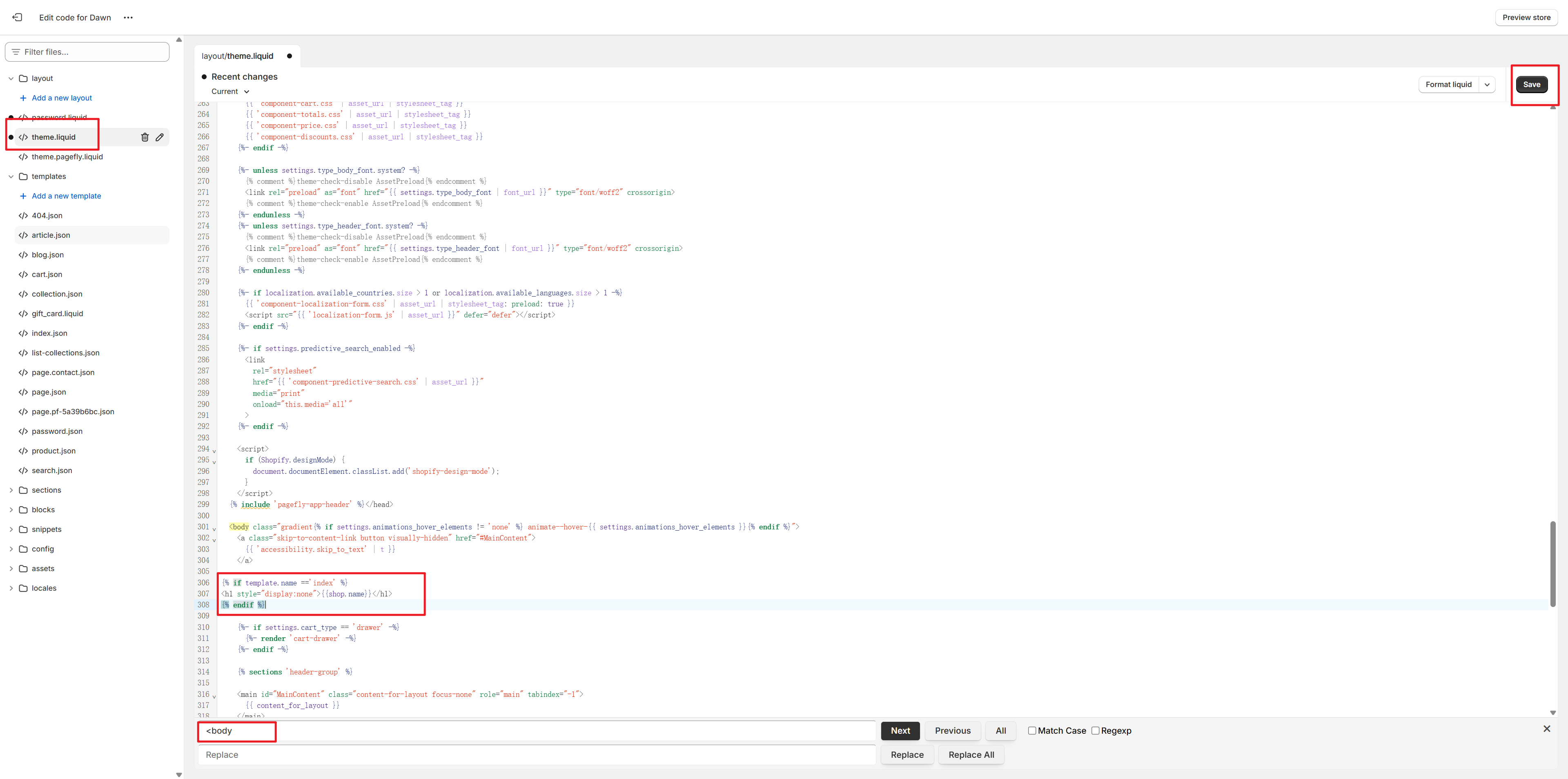
H1 tag implementation: Add custom Liquid code between <body> and </body> tags in theme.liquid file using the template conditional {% if template.name =='index' %}.
H2/H3 tags: Use Shopify’s built-in theme customizer to add heading blocks directly through the visual editor without code editing.
Alternative approach: Multiple respondents recommended SEO apps (Avada SEO Image Optimizer, SEOAnt) that can automatically manage header tags across product, collection, and blog pages, with some offering free trials and discount codes.
The discussion remains open with no confirmation from the original poster on which solution was attempted.
Summarized with AI on October 31.
AI used: claude-sonnet-4-5-20250929.
I am trying to improve the SEO of my Shopify store, so I am needing to add H1/2/3 tags in the best spots on my homepage today. I know where I want it, I just can’t figure out how to edit the code.
I have duplicated my theme so I have a backup. I had clicked edit code and searched through header.liquid but nothing I have read online is in there for me to edit, there no h1/h2/h3 code there at all despite I know there is already some in the code because I can see it when I look at the source code. so I am confused and stumped and I don’t want to break my website.
If you need to add Header tags on homepage, I can share you some suggestions here below for reference.
For H1 tags. You can directly use my shared code below and add it between and by pressing Ctrl+F to search “<body” in theme.liquid file after accessing Shopify backend by clicking Online Store-Themes-three dots near Customize button-Edit code to find it.
{% if template.name =='index' %}
# {{shop.name}}
{% endif %}
Note: Remember to place H1 code in the empty place between and and do not mix it with other normal codes, or it will not work.
For H2/H3 tags. I suggest you can directly add Heading tags from Shopify backend after clicking the Customize button and you can set them up directly based on the settings provided by Shopify.
Moreover, if you need an APP which can help detect the Header tags, you can give SEOAnt APP a try, as it contains one feature called SEO Checker and can help you detect the missing Header issues on Homepage, Product, Collection, Blog, and other pages, etc. In this way, you can better understand store performance and optimize it in a more structured way.
Also SEOAnt provides free and paid Plans both to help you save time and fully optimize store contents. If you feel interested in my recommendation here, you can click SEOAnt APP to install and use this coupon SEOAnt 30% Jeffery to fully test and experience the APP features. It can help you get a more reasonable price with 30% discount for the first two months and a 7-Day Free Trial.