I want to automatically add the tag “ordered” to ordered items.
Is this possible with the shopify flow app?
If it is possible, please let me know how to do it.
Thanks in advance.
I want to automatically add the tag “ordered” to ordered items.
Is this possible with the shopify flow app?
If it is possible, please let me know how to do it.
Thanks in advance.
Hey @wealthlly
I am sorry if I have not understood your requirement correctly, but I will share what I got from your message, if I have missed something please share the use case you are looking to solve so that I can assist you to the best of my capabilities.
You can create a workflow in Shopify Flow to automatically add the “ordered” tag an order when certain items are added . Here’s a quick guide on how to set it up:
Open the Shopify Flow app from your admin.
Click “Create workflow”.
For the Trigger, select “Order created”.
Add a Condition (e.g., only for certain products or order types).
Add an Action → choose “Add order tags”.
In the tag field, type “ordered”.
Once activated, this workflow will automatically tag every new order with “ordered.”
Looking forward to hearing from you.
Cheers,
Shreya
Hey @wealthlly
You can set a shopify flow where first you can validate the condition and then tag the order. To implement this please follow the steps below:
A condition drawer would slide, from that click on “Add a variable” button.
A popup will show up asking you to add the variables for condition. Please see the screenshot below:
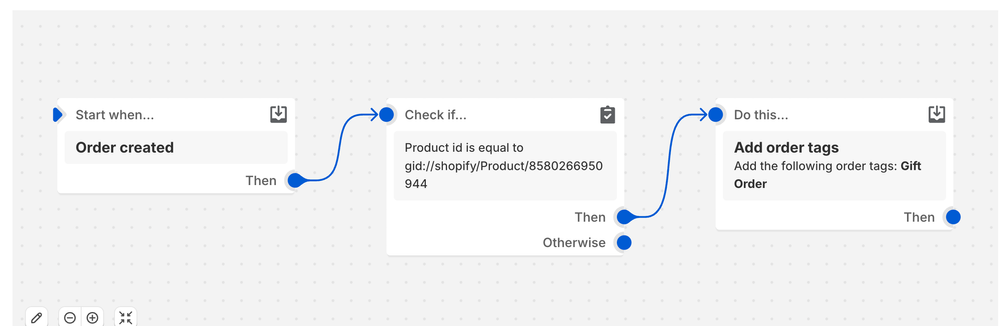
For example here I am tagging the order that contains a specific product. Please make sure to update the conditions of the flow as per your requirements.
Click on “Select product” and from the list of products you can search for the product for which you want to add a flow.
Once the product is selected, you will need to add an action for the flow, through which you can select whatever you want to do when this product is ordered on the store.
Done? Now you just need to turn on the workflow and bingo—you’re good to go! 
For example, in the screenshot below: you can see that I have created a flow for flagging a gift product, and if the order contains the product, then I will tag that order as Gift Order, you can update the tag name as per your requirement.
I hope this helps! 
If my response helped, please consider giving it a like (  ) and marking it as an accepted solution—it helps other merchants with the same question.
Regards,
Abhishek | Swym