I’m not sure if this has to do with the new One Page checkout or not. But I ran a Free Shipping promo this weekend and I received several messages from customers saying that the free shipping discount was not applied to their order. I went and checked the order and yes, the discount HAD been applied.
As I was digging further, I noticed that there is no “FREE” or a negative number showing on the checkout page for Shipping IF there is an automatically applied free shipping discount.
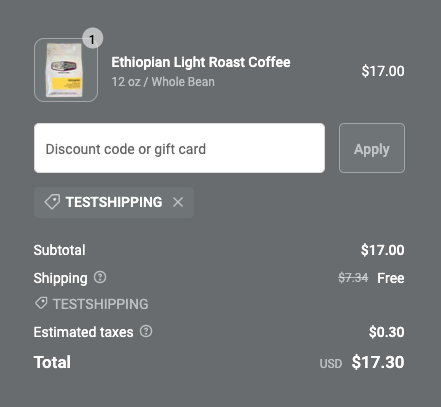
Here are screen shots of both the mobile site and the desktop site. Even though the discount code shows, unless the customer takes the time to add up in their head that the total does not include shipping, it’s not clear that the shipping discount has been applied because the dollar amount next to shipping still shows.
Make it an automatic discount and select whatever other options you want
Add a product to your cart that would apply to the discount and go to checkout.
When you do that, you see the above.
Conversely, if I create a discount code for free shipping (not automatic shipping) and type the discount code in on the checkout page, it shows the shipping amount with a strikeout and the words “Free”. This is the way things should be!!
That’s unfortunate. We recently launched an app (for Shopify Plus) to resolve the same by using Checkout Extensions to show the best applicable discounts based on cart items. Ace - https://apps.shopify.com/ace - You can set up a discount code - be it Shipping, BOGO anything - and if conditions are met, We will automatically show the discount code and one click apply for your customer.
If conditions aren’t met, we even nudge to add and unlock offers.
Please feel free to reach out if you need any assistance.
Any possible solution for this in terms of the presentation of the calculation? I am too, encountering the same complain from my online customers; complaining that the FREE SHIPPING discount is not being factored in although it had been taken into account correctly, but just a calculating showcasing issue that creates the confusion.
As a temporary solution, i am creating another free ship condition at Settings > Shipping & Delivery instead.