Best Way to Insert a Product into a Blog Post with Add to Cart (Without Using an App)

Topic summary

A user seeks to embed products with functional “Add to Cart” buttons directly into Shopify blog posts using HTML, without third-party apps. The goal is a responsive solution that displays product images, details, and seamless cart functionality.

Initial Approaches:

  • One response provided JavaScript code using localStorage to handle cart operations, though this creates a custom cart separate from Shopify’s native system.
  • The original poster shared working HTML markup as a starting point, planning to apply store styling later.

Recommended Solution (Metafields Method):
A detailed approach emerged using Shopify’s native metafields:

  1. Create a custom metafield definition under Settings → Custom Data → Blog Posts (type: Products, list format)
  2. Modify the main-article.liquid theme file with provided code that integrates product cards and quick-add functionality
  3. Select products via the metafield interface when editing blog posts
  4. Configure display settings in the theme customizer

Technical Notes:

  • Initial code contained Quick Add errors, later corrected in an updated version
  • Solution is based on Dawn theme version 15.3.0
  • Includes responsive mobile settings and native Shopify cart integration

The metafields approach provides native Shopify functionality rather than custom JavaScript workarounds.

Summarized with AI on October 30. AI used: claude-sonnet-4-5-20250929.

Greetings! (this is my first post on the Shopify Community Forum - forgive me if I should have known something)

I’m looking for the best way to insert a product into a blog post with an “Add to Cart” button, without relying on any third-party apps. I want to maintain a seamless shopping experience directly within the blog content.

Here’s what I’m trying to achieve:

  • Display the product image and details within the blog post.
  • Include an “Add to Cart” button that functions smoothly.
  • Ensure the solution is responsive and looks good on both desktop and mobile.
  • Script the process on my site in HTML to easily replicate it

Has anyone managed to implement this successfully? If so, I’d love to hear your approach! Any code snippets or step-by-step guides would be incredibly helpful.

Thanks in advance!

Brent

// Get the “Add to Cart” button
const addToCartBtn = document.querySelector(‘.add-to-cart’);

// Add a click event listener to the button
addToCartBtn.addEventListener(‘click’, () => {
// Get the product details
const productName = document.querySelector(‘.product-details h3’).textContent;
const productPrice = parseFloat(document.querySelector(‘.price’).textContent.slice(1));

// Add the product to the cart
addToCart(productName, productPrice);

// Update the cart display
updateCartDisplay();
});

function addToCart(name, price) {
// Retrieve the cart data from storage
let cart = JSON.parse(localStorage.getItem(‘cart’)) || ;

// Add the new product to the cart
cart.push({ name, price });

// Save the updated cart data to storage
localStorage.setItem(‘cart’, JSON.stringify(cart));
}

function updateCartDisplay() {
// Retrieve the cart data from storage
const cart = JSON.parse(localStorage.getItem(‘cart’)) || ;

// Update the cart display on the page
// (code for this part omitted for brevity)
}

Thank you!

Here is what I have working so far - the style is so I can see it working, I will take the styles from the store later.


  ">


    ### [ProductTitle]
    

Price: $[price]

    
      View Product


Hello @brentwpeterson ,

If you want to show products in a blog post, follow these steps:

  • Go to Dashboard → Settings → Custom Data → Blog Posts. Click Add Definition, enter the name (e.g., Products), select the type as Products, choose the list of files, and save it.

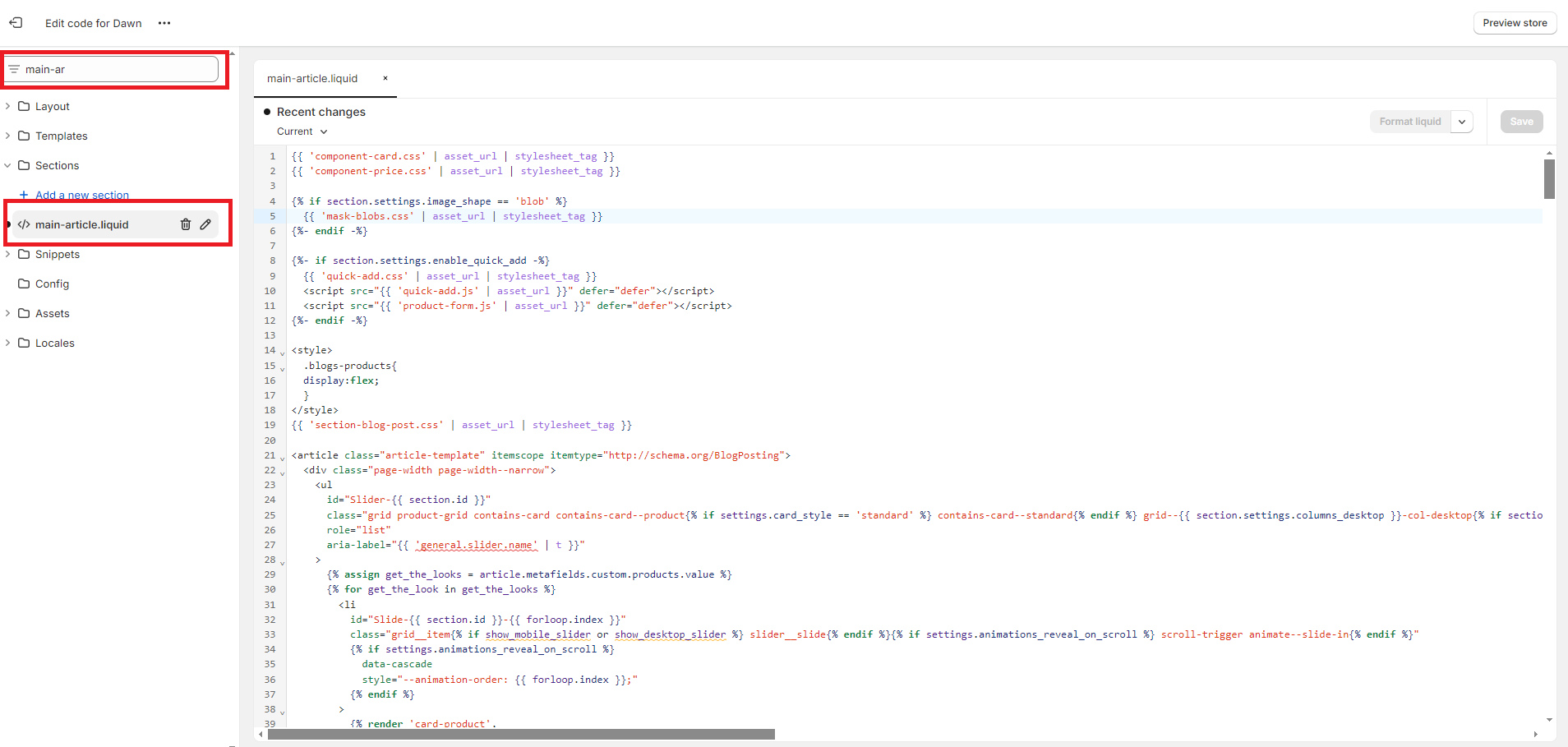
  • Go to Online Store → Edit Code, search for the file main-article.liquid, and replace all the code above with the new code. Save it.
    Navigate to Online Store → Blog Posts, select the blog post where you want to display the products, go to Metafields, and select the products you want to display.

{{ 'component-card.css' | asset_url | stylesheet_tag }}
{{ 'component-price.css' | asset_url | stylesheet_tag }}

{% if section.settings.image_shape == 'blob' %}
  {{ 'mask-blobs.css' | asset_url | stylesheet_tag }}
{%- endif -%}

{%- if section.settings.enable_quick_add -%}
  {{ 'quick-add.css' | asset_url | stylesheet_tag }}
  
  
{%- endif -%}

{{ 'section-blog-post.css' | asset_url | stylesheet_tag }}

{% schema %}
{
  "name": "t:sections.main-article.name",
  "tag": "section",
  "class": "section",
  "settings": [
    {
      "type": "header",
      "content": "t:sections.main-collection-product-grid.settings.header__3.content"
    },
    {
      "type": "select",
      "id": "image_ratio",
      "options": [
        {
          "value": "adapt",
          "label": "t:sections.main-collection-product-grid.settings.image_ratio.options__1.label"
        },
        {
          "value": "portrait",
          "label": "t:sections.main-collection-product-grid.settings.image_ratio.options__2.label"
        },
        {
          "value": "square",
          "label": "t:sections.main-collection-product-grid.settings.image_ratio.options__3.label"
        }
      ],
      "default": "adapt",
      "label": "t:sections.main-collection-product-grid.settings.image_ratio.label"
    },
    {
      "type": "select",
      "id": "image_shape",
      "options": [
        {
          "value": "default",
          "label": "t:sections.all.image_shape.options__1.label"
        },
        {
          "value": "arch",
          "label": "t:sections.all.image_shape.options__2.label"
        },
        {
          "value": "blob",
          "label": "t:sections.all.image_shape.options__3.label"
        },
        {
          "value": "chevronleft",
          "label": "t:sections.all.image_shape.options__4.label"
        },
        {
          "value": "chevronright",
          "label": "t:sections.all.image_shape.options__5.label"
        },
        {
          "value": "diamond",
          "label": "t:sections.all.image_shape.options__6.label"
        },
        {
          "value": "parallelogram",
          "label": "t:sections.all.image_shape.options__7.label"
        },
        {
          "value": "round",
          "label": "t:sections.all.image_shape.options__8.label"
        }
      ],
      "default": "default",
      "label": "t:sections.all.image_shape.label",
      "info": "t:sections.all.image_shape.info"
    },
    {
      "type": "checkbox",
      "id": "show_secondary_image",
      "default": false,
      "label": "t:sections.main-collection-product-grid.settings.show_secondary_image.label"
    },
    {
      "type": "checkbox",
      "id": "show_vendor",
      "default": false,
      "label": "t:sections.main-collection-product-grid.settings.show_vendor.label"
    },
    {
      "type": "checkbox",
      "id": "show_rating",
      "default": false,
      "label": "t:sections.main-collection-product-grid.settings.show_rating.label",
      "info": "t:sections.main-collection-product-grid.settings.show_rating.info"
    },
    {
      "type": "checkbox",
      "id": "enable_quick_add",
      "default": false,
      "label": "t:sections.main-collection-product-grid.settings.enable_quick_buy.label"
    }
  ],
  "blocks": [
    {
      "type": "@app"
    },
    {
      "type": "featured_image",
      "name": "t:sections.main-article.blocks.featured_image.name",
      "limit": 1,
      "settings": [

        {
          "type": "select",
          "id": "image_height",
          "options": [
            {
              "value": "adapt",
              "label": "t:sections.main-article.blocks.featured_image.settings.image_height.options__1.label"
            },
            {
              "value": "small",
              "label": "t:sections.main-article.blocks.featured_image.settings.image_height.options__2.label"
            },
            {
              "value": "medium",
              "label": "t:sections.main-article.blocks.featured_image.settings.image_height.options__3.label"
            },
            {
              "value": "large",
              "label": "t:sections.main-article.blocks.featured_image.settings.image_height.options__4.label"
            }
          ],
          "default": "adapt",
          "label": "t:sections.main-article.blocks.featured_image.settings.image_height.label",
          "info": "t:sections.main-article.blocks.featured_image.settings.image_height.info"
        }
      ]
    },
    {
      "type": "title",
      "name": "t:sections.main-article.blocks.title.name",
      "limit": 1,
      "settings": [
        {
          "type": "checkbox",
          "id": "blog_show_date",
          "default": true,
          "label": "t:sections.main-article.blocks.title.settings.blog_show_date.label"
        },
        {
          "type": "checkbox",
          "id": "blog_show_author",
          "default": false,
          "label": "t:sections.main-article.blocks.title.settings.blog_show_author.label"
        }
      ]
    },
    {
      "type": "content",
      "name": "t:sections.main-article.blocks.content.name",
      "limit": 1
    },
    {
      "type": "share",
      "name": "t:sections.main-article.blocks.share.name",
      "limit": 2,
      "settings": [
        {
          "type": "text",
          "id": "share_label",
          "label": "t:sections.main-article.blocks.share.settings.text.label",
          "default": "Share"
        },
        {
          "type": "paragraph",
          "content": "t:sections.main-article.blocks.share.settings.featured_image_info.content"
        },
        {
          "type": "paragraph",
          "content": "t:sections.main-article.blocks.share.settings.title_info.content"
        }
      ]
    }
  ]
}
{% endschema %}
  • Go to Online Store → Customize → Blog Posts, go to the blog post settings, and configure the settings as desired.

2 Likes

I will try this! Thank you

Is this automatically supposed to show because you don’t advise to add the section on the last screenshot. Plus there’s an error in your code with regards to the Quick Add.

hi could you please tell me how to fix the error of the Quick Add ? thank you

Hello @BA_chloe ,

I have updated the code and fixed the issue with the quick add.

If you want to show products in a blog post, follow these steps:

  • Go to Dashboard → Settings → Custom Data → Blog Posts. Click Add Definition, enter the name (e.g., Products), select the type as Products, choose the list of files, and save it.

  • Go to Online Store → Edit Code, search for the file main-article.liquid, and replace all the code above with the new code. Save it.
    Navigate to Online Store → Blog Posts, select the blog post where you want to display the products, go to Metafields, and select the products you want to display.

{{ 'component-card.css' | asset_url | stylesheet_tag }}
{{ 'component-price.css' | asset_url | stylesheet_tag }}

{% if section.settings.image_shape == 'blob' %}
  {{ 'mask-blobs.css' | asset_url | stylesheet_tag }}
{%- endif -%}

{%- if section.settings.quick_add == 'standard' -%}
  
{%- endif -%}

{%- unless section.settings.quick_add == 'none' -%}
  {{ 'quick-add.css' | asset_url | stylesheet_tag }}
  
{%- endunless -%}

{{ 'section-blog-post.css' | asset_url | stylesheet_tag }}

{% schema %}
{
  "name": "t:sections.main-article.name",
  "tag": "section",
  "class": "section",
  "blocks": [
    {
      "type": "@app"
    },
    {
      "type": "featured_image",
      "name": "t:sections.main-article.blocks.featured_image.name",
      "limit": 1,
      "settings": [
        {
          "type": "select",
          "id": "image_height",
          "options": [
            {
              "value": "adapt",
              "label": "t:sections.main-article.blocks.featured_image.settings.image_height.options__1.label"
            },
            {
              "value": "small",
              "label": "t:sections.main-article.blocks.featured_image.settings.image_height.options__2.label"
            },
            {
              "value": "medium",
              "label": "t:sections.main-article.blocks.featured_image.settings.image_height.options__3.label"
            },
            {
              "value": "large",
              "label": "t:sections.main-article.blocks.featured_image.settings.image_height.options__4.label"
            }
          ],
          "default": "adapt",
          "label": "t:sections.main-article.blocks.featured_image.settings.image_height.label"
        }
      ]
    },
    {
      "type": "title",
      "name": "t:sections.main-article.blocks.title.name",
      "limit": 1,
      "settings": [
        {
          "type": "checkbox",
          "id": "blog_show_date",
          "default": true,
          "label": "t:sections.main-article.blocks.title.settings.blog_show_date.label"
        },
        {
          "type": "checkbox",
          "id": "blog_show_author",
          "default": false,
          "label": "t:sections.main-article.blocks.title.settings.blog_show_author.label"
        }
      ]
    },
    {
      "type": "content",
      "name": "t:sections.main-article.blocks.content.name",
      "limit": 1
    },
    {
      "type": "share",
      "name": "t:sections.main-article.blocks.share.name",
      "limit": 2,
      "settings": [
        {
          "type": "text",
          "id": "share_label",
          "label": "t:sections.main-article.blocks.share.settings.text.label",
          "default": "t:sections.main-article.blocks.share.settings.text.default"
        }
      ]
    }
  ],
  "settings": [
    {
      "type": "header",
      "content": "t:sections.featured-collection.settings.header_collection.content"
    },
    {
      "type": "range",
      "id": "columns_desktop",
      "min": 1,
      "max": 6,
      "step": 1,
      "default": 4,
      "label": "t:sections.featured-collection.settings.columns_desktop.label"
    },
    {
      "type": "header",
      "content": "t:sections.featured-collection.settings.header.content"
    },
    {
      "type": "select",
      "id": "image_ratio",
      "options": [
        {
          "value": "adapt",
          "label": "t:sections.featured-collection.settings.image_ratio.options__1.label"
        },
        {
          "value": "portrait",
          "label": "t:sections.featured-collection.settings.image_ratio.options__2.label"
        },
        {
          "value": "square",
          "label": "t:sections.featured-collection.settings.image_ratio.options__3.label"
        }
      ],
      "default": "adapt",
      "label": "t:sections.featured-collection.settings.image_ratio.label"
    },
    {
      "type": "select",
      "id": "image_shape",
      "options": [
        {
          "value": "default",
          "label": "t:sections.all.image_shape.options__1.label"
        },
        {
          "value": "arch",
          "label": "t:sections.all.image_shape.options__2.label"
        },
        {
          "value": "blob",
          "label": "t:sections.all.image_shape.options__3.label"
        },
        {
          "value": "chevronleft",
          "label": "t:sections.all.image_shape.options__4.label"
        },
        {
          "value": "chevronright",
          "label": "t:sections.all.image_shape.options__5.label"
        },
        {
          "value": "diamond",
          "label": "t:sections.all.image_shape.options__6.label"
        },
        {
          "value": "parallelogram",
          "label": "t:sections.all.image_shape.options__7.label"
        },
        {
          "value": "round",
          "label": "t:sections.all.image_shape.options__8.label"
        }
      ],
      "default": "default",
      "label": "t:sections.all.image_shape.label"
    },
    {
      "type": "checkbox",
      "id": "show_secondary_image",
      "default": false,
      "label": "t:sections.featured-collection.settings.show_secondary_image.label"
    },
    {
      "type": "checkbox",
      "id": "show_vendor",
      "default": false,
      "label": "t:sections.featured-collection.settings.show_vendor.label"
    },
    {
      "type": "checkbox",
      "id": "show_rating",
      "default": false,
      "label": "t:sections.featured-collection.settings.show_rating.label",
      "info": "t:sections.featured-collection.settings.show_rating.info"
    },
    {
      "type": "select",
      "id": "quick_add",
      "default": "none",
      "label": "t:sections.main-collection-product-grid.settings.quick_add.label",
      "options": [
        {
          "value": "none",
          "label": "t:sections.main-collection-product-grid.settings.quick_add.options.option_1"
        },
        {
          "value": "standard",
          "label": "t:sections.main-collection-product-grid.settings.quick_add.options.option_2"
        },
        {
          "value": "bulk",
          "label": "t:sections.main-collection-product-grid.settings.quick_add.options.option_3"
        }
      ]
    },
    {
      "type": "header",
      "content": "t:sections.featured-collection.settings.header_mobile.content"
    },
    {
      "type": "select",
      "id": "columns_mobile",
      "default": "2",
      "label": "t:sections.featured-collection.settings.columns_mobile.label",
      "options": [
        {
          "value": "1",
          "label": "t:sections.featured-collection.settings.columns_mobile.options__1.label"
        },
        {
          "value": "2",
          "label": "t:sections.featured-collection.settings.columns_mobile.options__2.label"
        }
      ]
    },
    {
      "type": "header",
      "content": "t:sections.all.padding.section_padding_heading"
    }
  ],
}
{% endschema %}

Copy

  • Go to Online Store → Customize → Blog Posts, go to the blog post settings, and configure the settings as desired.

Important Note: This code has been provided according to the Dawn theme and is based on Dawn theme version 15.3.0.