I am trying to figure out how to add a border around the color swatches on the landing page and product page. I have tried everything I think would change it. Nothing seems to do it. Any help would be greatly appreciated.
Topic summary
A user needed help adding a border around color swatches on their Shopify store’s landing and product pages, specifically wanting a 1px black border around circular color swatches.
Solutions Provided:
Two working approaches were offered:
-
Method 1: Navigate to Shopify admin → Online Store → Themes → Actions → Edit code. In the Assets folder, open the CSS file (base.css, style.css, or theme.css) and add custom CSS targeting
.swatch__button .swatch__labelwith border properties using CSS variables. -
Method 2: Go to Online Store → Customize → Settings → Custom CSS and paste code targeting the same selectors with a
border: 1px solidproperty.
Both solutions included visual examples showing the border implementation. The user confirmed one of the methods successfully resolved their issue.


1 Like
Hi, I am just looking to add a black 1px border around the circle color swatches.
Hi @Paulloula
Check this one.
From your Shopify admin dashboard, click on “Online Store” and then “Themes”.
Find the theme that you want to edit and click on “Actions” and then “Edit code”.
In the “Assets” folder, click on “base.css, style.css or theme.css” file, depending on which file your theme uses to store its CSS styles. At the bottom of the file, add the following CSS code:
.swatch__button .swatch__label {
    border: var(--BORDER-WIDTH) solid var(--border);
}
And Save.
Result:

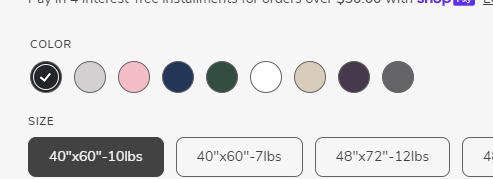
FYI, I copy the same border on the size.
1 Like
Go to your online store → customize → settings → custom css and pate this code there
.swatch__button .swatch__label {
    border: 1px solid;
}

Thank You, this worked.