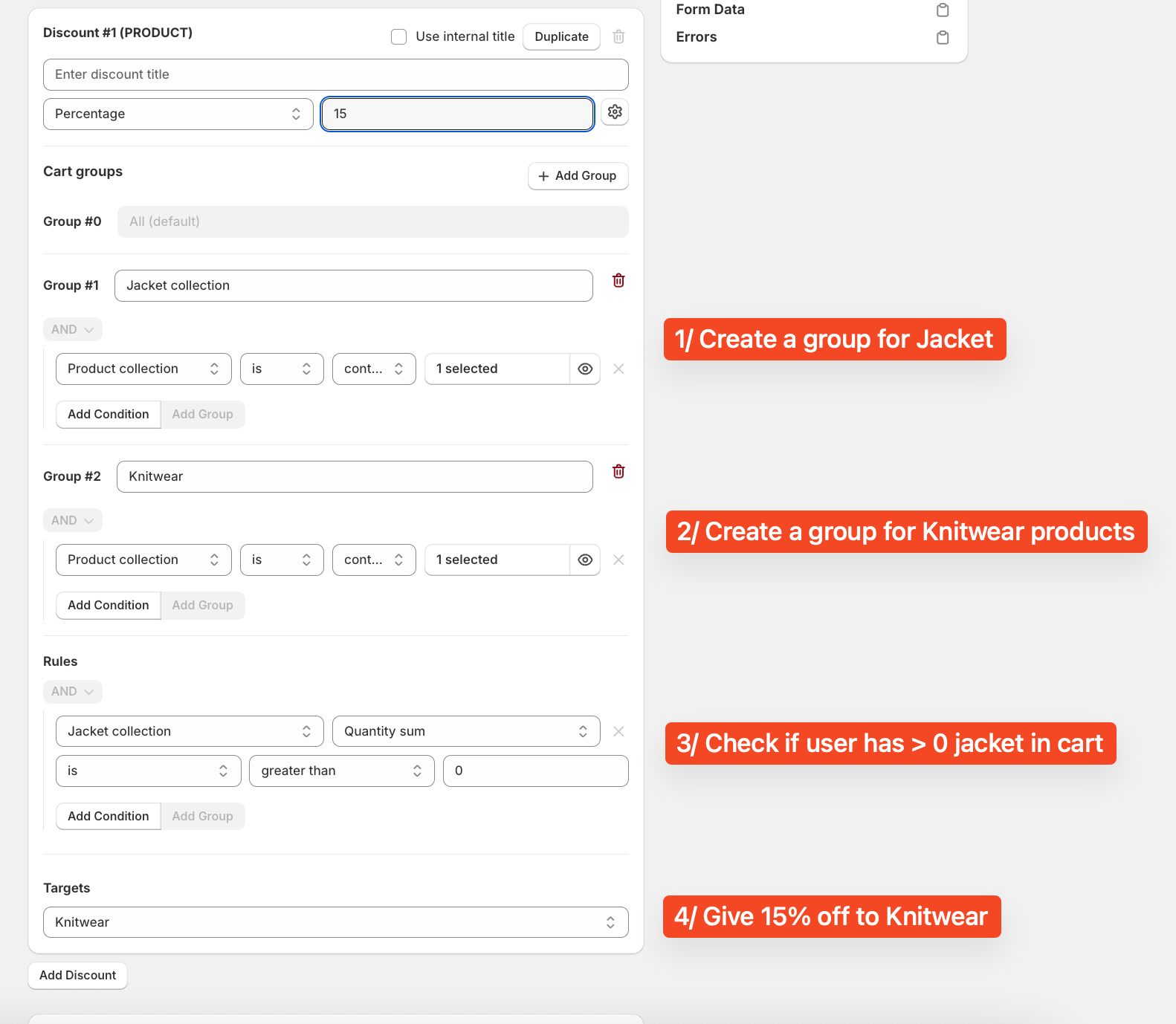
Goal: Set a cross-collection promotion: when a customer buys from the Jacket collection, apply 15% off items in the Knitwear collection (collection-level, not product-level).
Current status: The requester previously tried Vitals but couldn’t find an option to target collections rather than individual products.
Proposed solutions (Buy X Get Y/BOGO = Buy One Get One-style rules):
Regios Automatic Discounts: Set a cart condition for items from the Jacket collection and apply a 15% “Get Y” discount to the Knitwear collection. Screenshot provided.
BOGOS: Configure 15% off specific products in a collection when Jacket items are in cart. Screenshot provided.
Discount Bot: Supports collection-based triggers/offers, plus extras like capping “Get Y” quantities, multi-tier discounts, and built-in bulk code generation. Screenshots provided.
Additional app suggestions: Bold Discounts, Shopify Bundles, MBC Bundles, Qikify Upsell BOGO & Free Gift, Kaktus (Buy X Get Y, Free Gifts), Shopify Collabs, AiTrillion (Buy X Get Y or percentage discount to a specific collection; can send via email/SMS/web push).
Outcome: No confirmed resolution; multiple viable apps suggested with examples. Key open point: selecting an app that supports collection-level conditions and discounts directly.
Summarized with AI on November 25.
AI used: gpt-5.
If you’re looking for a way to offer a discount on products in one collection when a product from a different collection is in the cart, our app, Regios Automatic Discounts (4.9 stars, 48 reviews), can do just that.
You can set a condition to “Check if specific products are in the cart” (e.g., from the Jacket collection) and combine it with a “Get Y” discount to apply 15% off to products in the Knitwear collection.
Feel free to reply if you have any questions—I’d be happy to assist!
@Laurah12 , I didn’t see this marked as resolved, so I would like to suggest you try the BOGO discounts from our app Discount Bot.
On top of allowing you to apply discounts to products in one collection based on another collection in the cart like you requested, the app allows you to configure these additional things:
Create a BOGO discount that applies up to the specified number of Get Y quantities, rather than only applying the discount when the exact specified quantity is added to the cart.
Create multi-tier discounts and choose between applying All, Maximum or First discount from all the tiers
Create bulk codes for any discount using the built-in bulk codes section without having to use another app
I want to inform you that Buy X and Get Y discount or discount on specific collection can be done with the help of AiTrillion. I want to inform you that there are various ways through which you can send the discount to customers which are:
1.) Loyalty rewards
2.) Store credit
3.) Percantage discount to specific collection
Also, I want to inform you that the discount can be sent to the Email/SMS/Webpush with the same app.
Additionally, it includes multiple tools like Customer account, Reviews and many more to boost engagement.
This specific scenario—“Buy from Collection A (Jackets) to get a discount on Collection B (Knitwear)”—is actually harder than it sounds with standard BOGO apps.
Most apps force you to pick specific products (e.g., “Buy Jacket A, get Knitwear B”) rather than letting the customer mix and match freely from entire collections.
To get that “Any Jacket + Any Knitwear” logic without manually creating thousands of combinations, you should look at a “Mix & Match” Bundle rather than a standard discount app.
You can set this up in Bundlesuite using the following logic:
Create a Mix & Match Bundle: Set up a new bundle with 2 distinct “Slots.”
Configure Slot 1 (The Trigger): Assign your “Jackets” Collection to this slot. This requires the customer to pick one jacket.
Configure Slot 2 (The Reward): Assign your “Knitwear” Collection to this slot.
Set the Discount: Apply a 15% discount to the bundle.
Why this works for your use case:
Collection-Based Logic: It pulls directly from your collections, so you don’t have to manually link Jacket A to Knitwear Z. If you add a new jacket to the collection later, it automatically works with the bundle.
Inventory Sync: It syncs with the real SKU inventory (so you don’t oversell a specific size of knitwear).
Visual Clarity: It creates a dedicated “Lookbook” style page where customers can clearly see they need to pick one of each to get the deal, which usually converts better than a hidden automatic discount.
Full Disclosure: I am part of the team behind Bundlesuite. We built the “Collection Slots” feature specifically for this kind of apparel pairing, so I hope it helps you get that promo live!