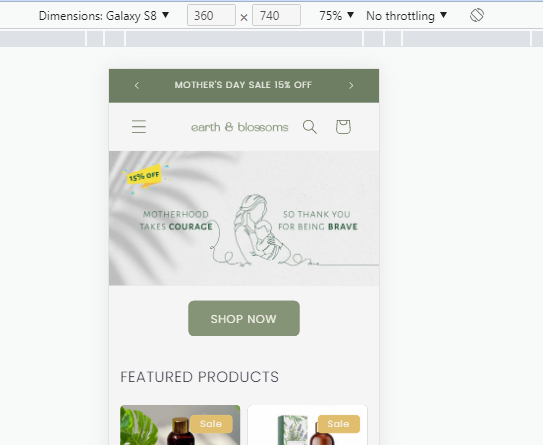
Dawn Theme. - Mobile home page banner sizing issue

Topic summary

A user encountered a mobile banner sizing issue on their Shopify store using Dawn theme 15.3.0. Despite trying multiple image sizes following guidelines, the hero banner displayed correctly on desktop but failed to adjust properly on mobile devices.

Solution provided:

  • Custom CSS code added to base.css file to control mobile banner height and image object-fit properties
  • Additional CSS snippet provided to reduce padding around the “Shop Now” button

Outcome:
Both CSS solutions successfully resolved the sizing issues. The discussion is now closed with the problem fully addressed through custom code modifications.

Summarized with AI on October 28. AI used: claude-sonnet-4-5-20250929.

Hi Team,

I am using dawn theme 15.3.0.

When I uploaded a new hero banner, the desktop version is working correctly, how ever the mobile version, what ever I tried does not work in terms of adjusting the size to fit the mobile.

I have tried multiple sizes, images as per guidelines and still not working

Would you please help me here?

regards

Joseph

1 Like

Hello @earthnblossoms

  1. In your Shopify Admin go to online store > themes > actions > edit code
  2. Find Asset > base.css and paste this at the bottom of the file:
@media screen and (max-width: 749px) {
.banner--mobile-bottom:not(.banner--adapt) .banner__media,
.banner--large.banner--stacked:not(.banner--mobile-bottom):not(.banner--adapt) > .banner__media {
height: auto !important;
min-height: 180px;
display: block;
position: relative;
}
.banner__media img {
width: 100% !important;
height: 100% !important;
object-fit: cover;
display: block;
}
}

2 Likes

thanks @devcoders that works and is it possible to reduce the space above and below the shop now button

1 Like

Hello @earthnblossoms

  1. In your Shopify Admin go to online store > themes > actions > edit code
  2. Find Asset > base.css and paste this at the bottom of the file:
.banner--mobile-bottom .banner__box {
    padding: 2rem 3.5rem;
}

1 Like

thanks

1 Like

Hello @earthnblossoms
Thank you for your response. It’s good to know that it’s worked for you. Kindly feel free to get back to me if you need any further assistance. If helpful, please like all posts.