drawer menu on my website
doesnt work, it makes the screen grey and dont open any menu
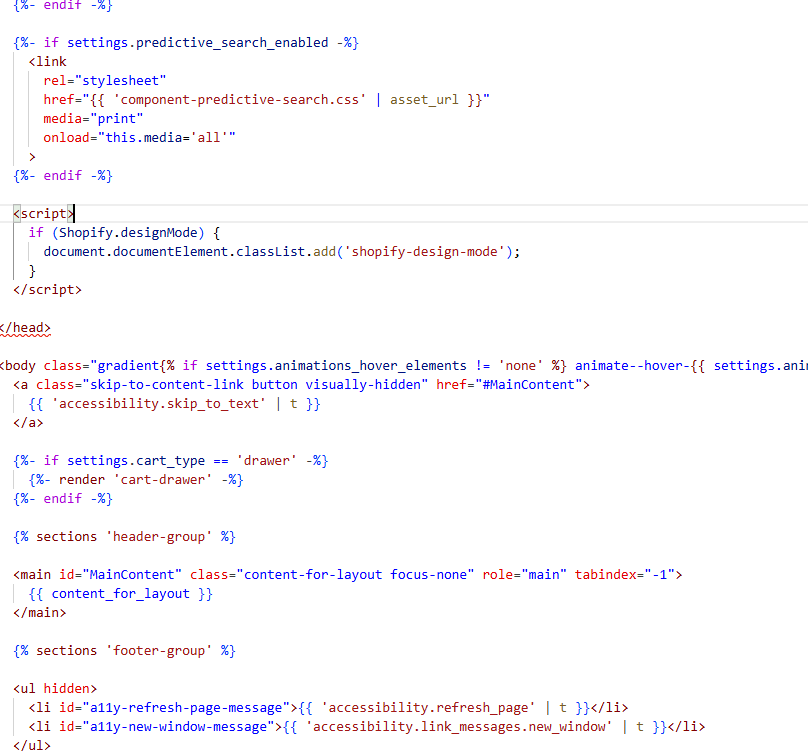
Shopify drawer menu overlay turns the screen gray and doesn’t open. Root cause was an invalid/missing tag in theme.liquid; restoring the header and ensuring fixed the basic opening behavior.
A warning message appeared after the fix; it’s stated as safe to ignore. Animation looks odd under RTL.
Orientation request: keep buttons on the left, have the drawer slide in from the right. Implemented via Custom CSS:
Disagreement:
Current status: Menu opens and right-side behavior works; desktop animation still not playing. The “js”/HTML fix reportedly didn’t change desktop animation. Further clarification and testing are pending; no final resolution yet. Images and a screen recording were shared to illustrate errors/animation.
drawer menu on my website
doesnt work, it makes the screen grey and dont open any menu
@user3579 please add this css to the very end of your base.css file and check
shopify admin->online store->themes->edit theme code->assets->base.css
.menu-drawer-container.menu-opening .menu-drawer{visibility: visible !important;}
NO, this is not to be fixed with CSS.
Follow this recommendation:
can u tell me how to restore it?
There is a link to github with the theme original source code in the linked post
Go to your site, Online Store, then “Edit theme code”
Go to layouts/theme.liquid and restore the very top of that file – first 2 lines, I believe.
You can actually try adding a direction as well – it may help because I see there are attempts to fix it with CSS…
<html class="js" lang="{{ request.locale.iso_code }}" dir="rtl">
This warning you can safely ignore. See Problem in the liquid theme code - #6 by tim_1
I actually see animation, it’s just it’s a bit strange, probably because of RTL.
theres a way to make the menu appear on the right site with normal animation
?
@user3579 try my given css, if any issue appears we can try to solve it
it didnt do nothing, the menu still appears on the wrong side with bad animation
Theme already has CSS to show menu drawer. It does not work because <html> misses the class js. Actually, there was no <html> in their theme code at all.
Your may work, but without <html> their HTML code is still invalid.
Ok, so you want your menu to slide in from the right?
Even though the open and close buttons are still on the left?
Ok, if you need to keep buttons on the left, but menu should slide in from the right, add this to the “Theme settings”(cog icon)=> “Custom CSS”:
.menu-drawer {
  transform: translate(100%);
}
to where? and theres a way to make all text in middle
@user3579 add to the very end of your base.css file, also to make it center, add this line as well
.list-menu__item{justify-content: center;}
.menu-drawer__account {justify-content: center;  width: 100%;}
thanks it worked, but the animation doesnt work on computer