Drop down quantity for product variant options

Topic summary

A user seeks to implement dynamic quantity dropdowns based on product variant selections. Specifically, when customers choose pack sizes (6, 12, or 24 packs), the quantity selector should display multiples of that pack size (e.g., selecting 6 packs shows quantities: 6, 12, 18, 24, 30…; selecting 12 packs shows: 12, 24, 36…, etc.).

Technical Approach Suggested:

  • Create a custom product template to avoid affecting existing products
  • Modify both HTML and JavaScript files
  • Add JS code in theme.js to check variant values and display corresponding quantities
  • Change quantity display to dropdown format
  • Note: Requires coding experience; professional developer recommended

Alternative No-Code Solution:
The Easify Product Options app (free) was suggested as a simpler alternative:

  • Set up Pack-size option using Buttons or Dropdown
  • Add conditional quantity options that appear based on pack size selection
  • Use Conditional Logic to show relevant quantity choices for each pack size
  • Alternatively, use Quantity input type for direct entry with automatic price calculation

Status: The original poster indicated this would apply to select products only, manageable through individual variant setup or separate product templates. No final resolution confirmed.

Summarized with AI on November 18. AI used: claude-sonnet-4-5-20250929.

Hi everyone,

I need help with features to enable qty drop down when customer select a option of product variant.

For example: product variant: Pack-size Option: 6 packs, 12 packs, 24 packs.

when customer select 6 then i want to display 6, 12, 18, 24, 30, 36…60 quantity drop down. similarly with 12packs (12, 24, 36…120) and 24 packs (24, 48, 72…240).

I am not developer, but can manage copy paste code and trouble shooting if given code example and which file/folder to put it in.

Thanks

Dd

Hi @Dd ,

I checked and it is a complex requirement, you need to change both HTML and JS, do you want to apply it to some products or all products?

Please send me your theme name and site link, I will help you check it

hi @LitExtension ,

it will be applicable to some product only, so will be managing the option through product variant setup individually. but open to creating separate product template if that’s better solution.

here is the product link

https://urxm6f4gj1e3o1uh-58616676548.shopifypreview.com/products_preview?preview_key=2b3291bfd6657badfadd2d142b8584ed

here is the theme link

Appreciate the assistance.

Regards,

Dd

Hi @Dd ,

As mentioned before, it is a complex requirement and requires you to have experience with the code, otherwise, I recommend you to hire a professional for it. You can follow the suggestion with the following steps:

Ex code:


please note about data-quantity-variants

  • Step 3: You need to add JS code in theme.js file to check and display quantity according to variant value.

This needs to be changed and tested directly with the code so it will be difficult for someone to guide you in more detail. Hope it gives you ideas about this.

If it helped you solve your issue, please mark it as a solution. Thank you and good luck.

Hi @Dd ,

Although it has been a while since your topic was raised, I would still like to suggest a simple solution for you and other members who may encounter a similar issue in the future, no coding required :hugs: .

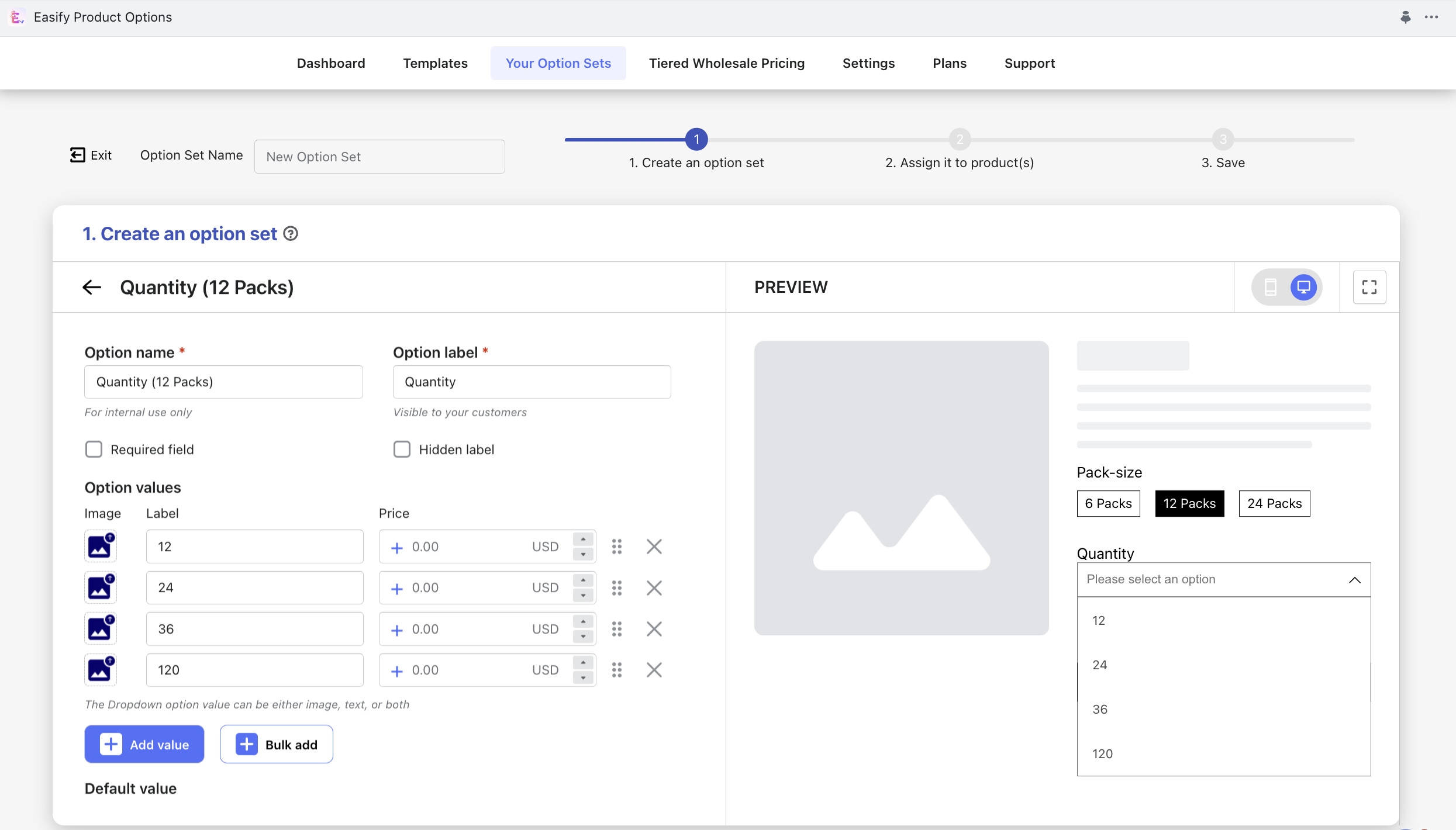
To set up custom options as you described, the free Easify Product Options app can be utilized.

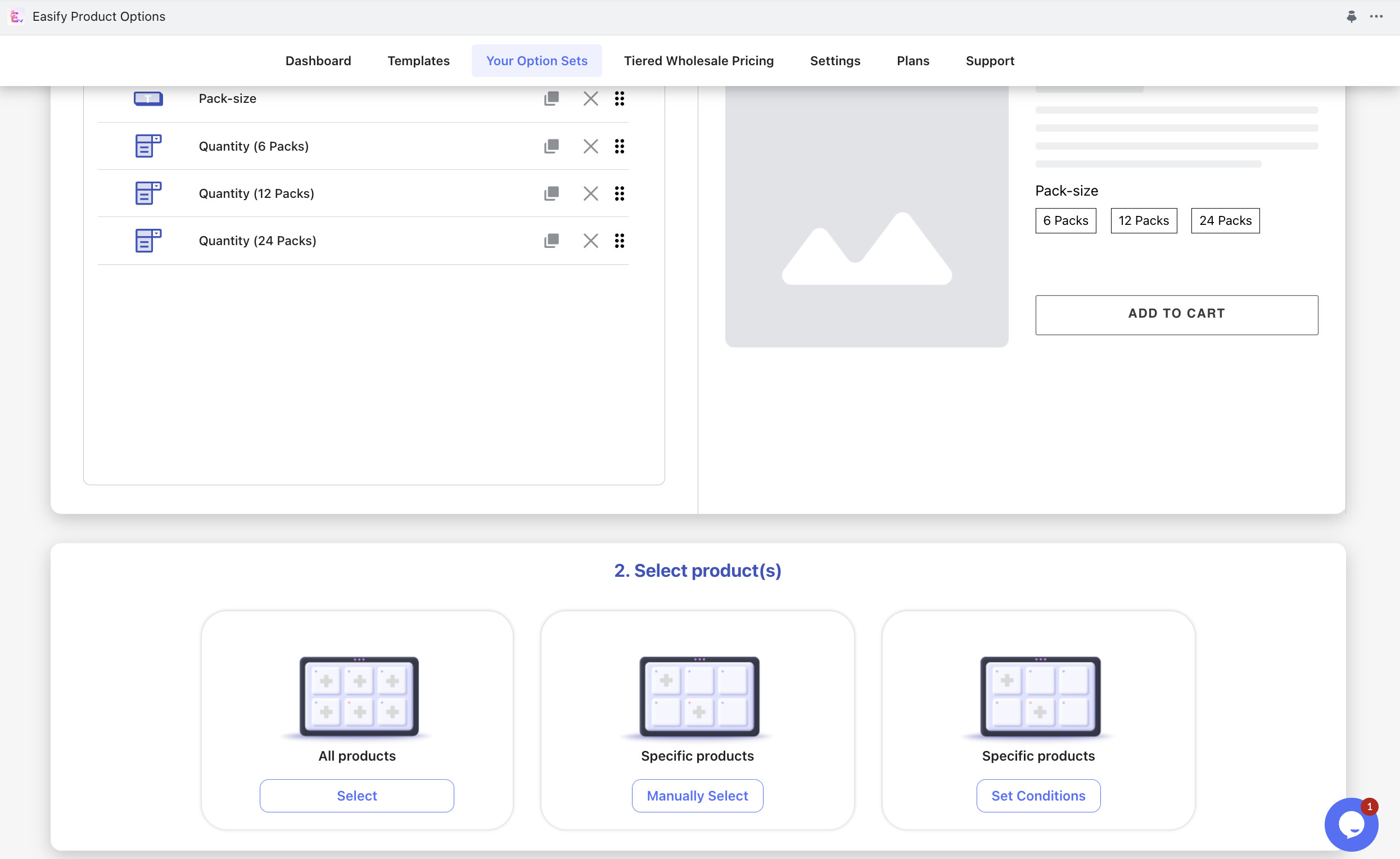
Here’s a quick demonstration on how to use the app for setting up your options:

  • Create a new option set.

  • Add the Pack-size option using the Buttons or Dropdown option type.

  • Add a second option for customers to choose from after selecting “6 packs.” Use the Dropdown option type and set up Conditional Logic to display this option only when customers select “6 packs” in the Pack-size option.

  • Add a third option for customers to choose from after selecting “12 packs.” Utilize the Dropdown option type and set up Conditional Logic to show this option only when customers select “12 packs” in the Pack-size option.

  • Add a fourth option for customers to choose from after selecting “24 packs.” Apply the Dropdown option type and set up Conditional Logic so that this option appears only when customers select “24 packs” in the Pack-size option.

  • Assign your option set to the relevant product(s).

Regarding the Quantity options, instead of using a Dropdown with a large number of options, you can utilize the Quantity option type provided by the Easify Product Options app. This allows customers to enter the desired quantity directly, and the total price will be automatically calculated based on the quantity entered:

That’s it! You’re all set :raising_hands: .