Im not exactly sure how to phrase this but heres what I am trying to accomplish.
On the product page how would I have a quantity menu that then creates required fields based on quantity selection?
I need to allow customers to select a quantity then a color for each item.
Ex:
Quantity Dropdown menu has options: 1,2,3,4,5
If 5 is selected than 5 “color option” fields would appear/be required to be filled in.
How do I go about this?
Hi @BBSigns ,
This can be done with theme code. It is like if you want to add to cart Bundle Products, but instead of different products, it will display the same product and use JS to hide or show the number of products according to the quantity.
It will be complicated requirement, so no one will be able to guide you in detail here, you can only hire experts for it. Just post a question in the group, there will be many experts who can set it up for you: https://community.shopify.com/c/Shopify-Ecommerce-Jobs/bd-p/shopify-job-board
Hope it helps!
Is this the only solution? There is no way I can accomplish this on my own?
If I do need to go the “hire an expert” route, how much would be a fair price for this kind of integration?
Also are there any APPs that would facilitate this integration?
Hi @BBSigns ,
You can still install the app for it, but need to customize the app, because currently I have not found any app that supports 100% as your description. Refer https://apps.shopify.com/bundles
And most apps will charge a fee so for best I recommend you hire a professional, they will change it and it won’t need to pay extra monthly. The cost will depend on the theme and per person, it can range from $80-$150
If it helped you solve your issue, please mark it as a solution. Thank you and good luck.
Hi @BBSigns ,
It’s been a while since you first brought up this topic, and I’m not sure if you’ve found a suitable option yet. Nonetheless, I’d like to suggest a solution that can be helpful not only for you but also for other members who might face a similar issue in the future. The best part is, you don’t need any coding knowledge or developers  . You can set it up yourself!
To achieve the desired options setup, I recommend using the free Easify Product Options app. Below, I’ll demonstrate how you can easily configure your options:
- Start by creating a new option set.
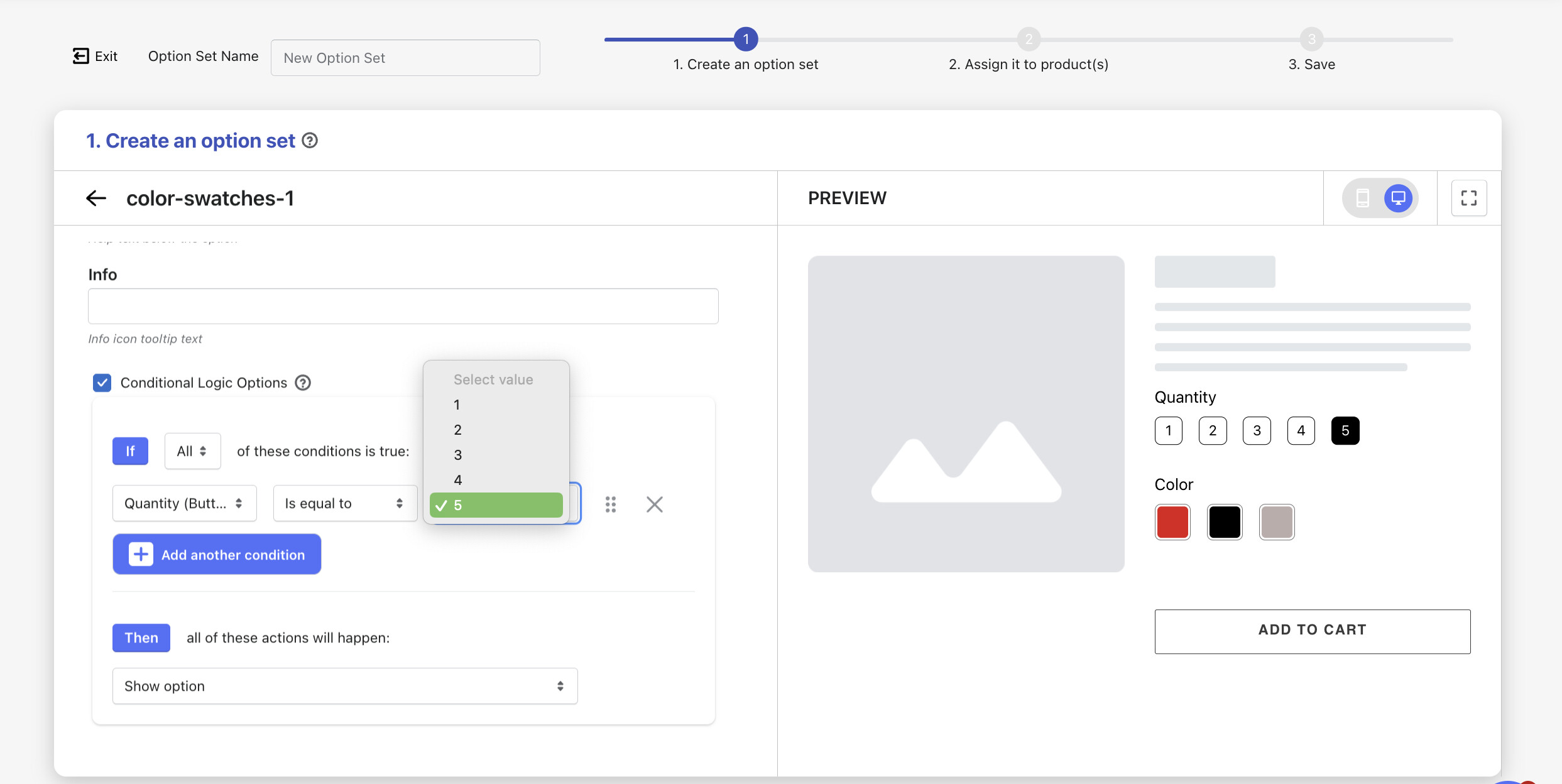
- Add an option that allows customers to select the Quantity using the Dropdown (or Buttons) option type.
Dropdown:
Buttons:
- Next, add another option that allows customers to choose Colors, but only after they have selected “5” in the previous Quantity Dropdown. You can do this using the Color Swatches (or other proper option types) and Conditional Logic feature provided by the app.
- Finally, make sure to assign your newly created option set to the relevant products, and you’re all set!
As you can see, setting up custom options with the Easify Product Options app is a breeze. I highly recommend giving it a try, as there are even more interesting features for you to explore  !
!