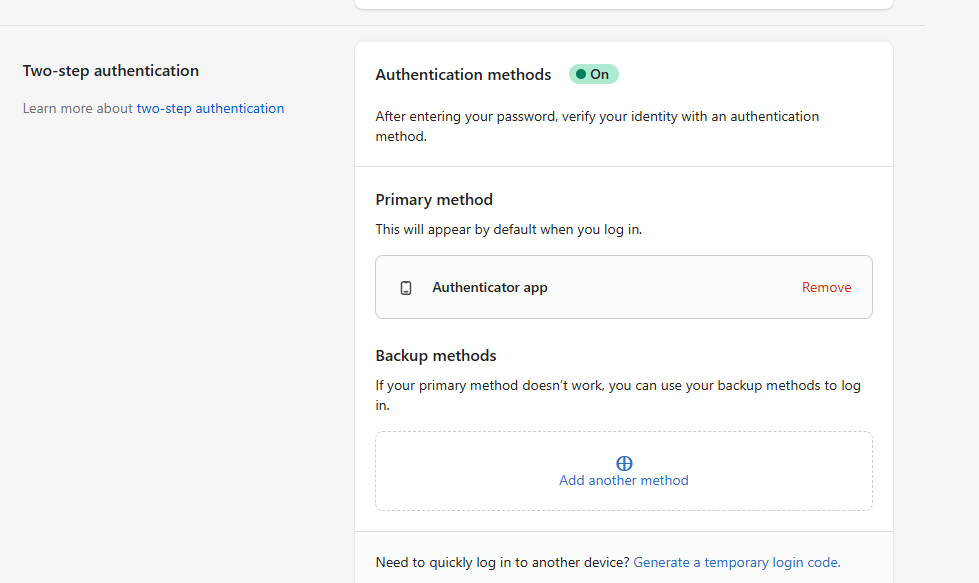
Hello, I want to turn off the two-step authentication.
Hi @MariaGarcia ,
Here’re the steps to deactivate two-step authentication:
- From your Shopify admin, click your username and account picture.
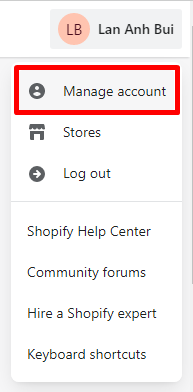
- Click Manage account > Security.

- In the Two-step authentication section, click Remove that is next to the authentication method that you want to deactivate.
- Enter your password, and then click Remove.
I hope it helps.
1 Like
Thank you for the response, it resolved my issue.
You’re welcome 
Hi Team,
I tried to remove this 2-step authenticator, but it led me to reauthenticate by FB log-in.
Then when I click “Reauthenticate”, it asks me if I want to continue as Allen Zhao which is my FB account. I clicked on continue and it asked me to check the authentication app again which I never used. It is like a dead circle, my original request was to remove this, but now it kept coming back.
Your support is much appreciated.
Allen