I’m using the Shopify tax report to try to fill in the ST-1 and ST-2 forms but this just seems way more complicated then it needs to be.
Some issues I’m running into:
In the shopify tax report the tax name might say “Algonquin City Tax” but there are two cities with this name. I’m guessing that at this point I have to actually look up the tax rate of the address of the buyer and confirm which one it is?
The tax rates that Shopify are collecting seem very off. For example, I’m collecting 0.0125 for Chicago City sales tax but if I look up the rate it’s saying that the rate is like 0.08. This makes me feel like i’m really missing something.
I collected tax for Regional Transport. Authority but I can’t figure out where to report that
I collected tax for a country that isn’t even showing up on-line form (Lasalle County Tax)
I also collected a bunch of State sales tax, again I don’t know where that goes.
Does everyone just use a tax service like TaxJar?
Some examples of the tax rates being different:
Tax name - Shopify rate collected - Official rate from State
Logan County - 0.02 - 0.0825
What you see in the order info is the broken-down tax line. So while the total Chicago sales tax rate can be 10.25%, the portion that goes to Chicago city is 1.25%, which is what you saw in the order. The regional transport authority tax is considered as part of the county tax.
Filing tax can be a daunting task, that’s why services like Sidr Tax and Avalara provide autofiling, which makes it a lot easier for you.
Illinois reporting is a nightmare. Were you able to figure it out?
I had posted originally here what worked for me last month, but it looks like the reports changed. I will figure it out again and repost for anyone that might need it.
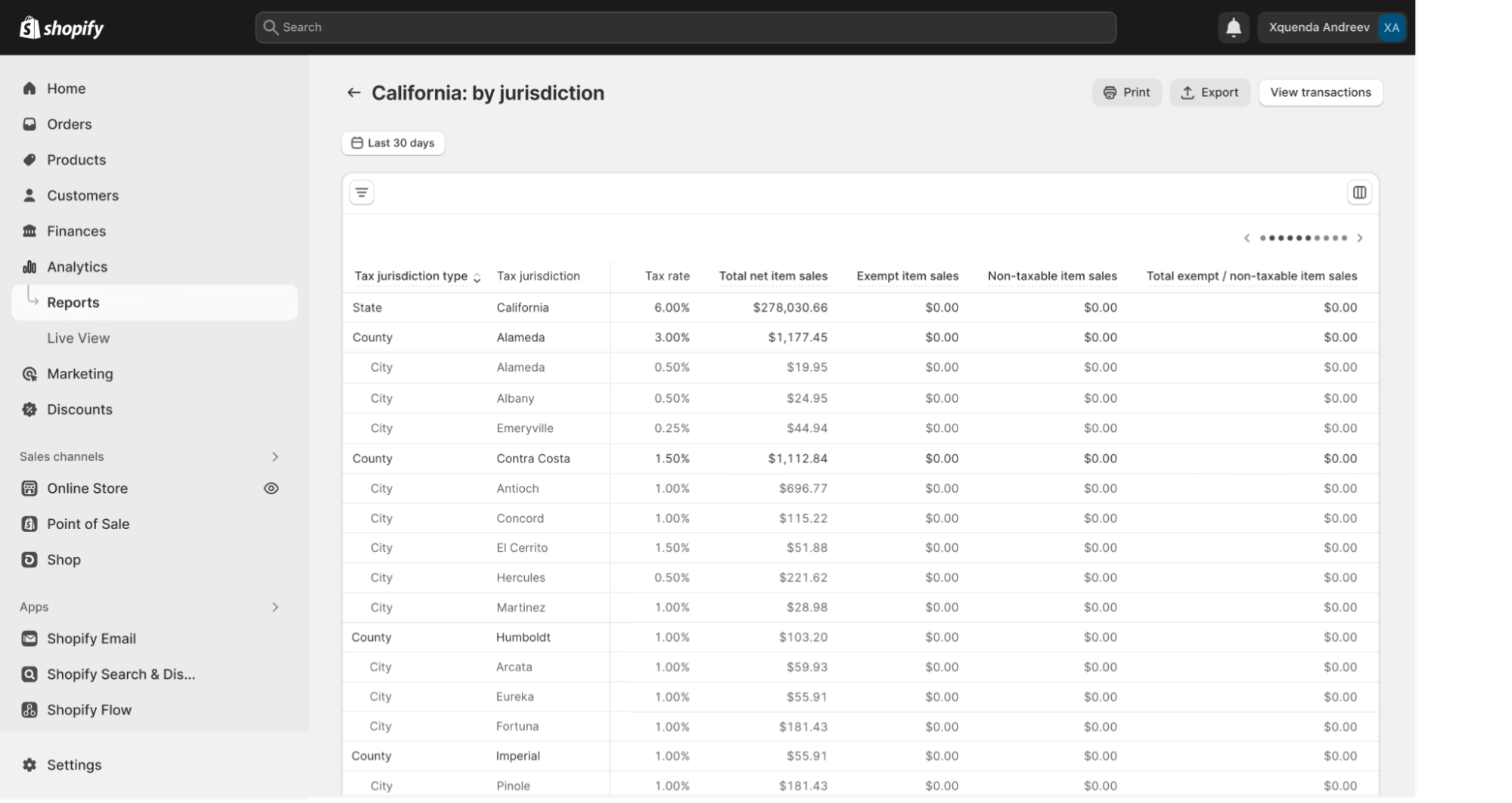
Shopify just created a new “US Sales Tax Report” with the jurisdictions broken out for this purpose, but for some odd reason, you can only run the report for Today, Yesterday, Last 7 Days, and Last 30 Days. You can’t run it for the prior month. Totally useless.
Unfortunately, the standard Shopify reports are a bit limiting in the way of tax reporting.
Our Report Toaster app can help. We have a lot of merchants use our tax reports to help them file. Please feel free to take a look and let us know if you have any questions.
It looks like complaining to Shopify yesterday about not having the US Tax Report for Prior Month worked. Logged in today to file IL and now there’s a “June 2023” option in the dropdown for the Prior Period.
@clovehitch00 For tax periods prior to June 2023, instead of looking up the individual addresses, if you export all orders from your Tax Period from the top of the Orders page into a CSV, columns BI to BP will show which tax municipalities were collected for that order. So you can figure them out that way.
Starting with June 2023 tax period, you can go to the new “United States sales tax” report under Analytics → Reports, and click on Illinois. Then select the reporting period from the drop down.
Since we file by Jurisdiction, I sorted by “Tax Jurisdiction Code” and it will show you each jurisdiction grouped together under the “tax jurisdiction code” column. The sales are repeated for each line, so they’re not added together. For example, Chicago (Cook County) has 4 rows: Illinois, Cook, Chicago, and RTA. The sales for each line are the same, it’s only the tax that’s different.
For filing, you have to add the “Total Taxable Item Sales” and “Total Shipping” together for the IL website for any of those 4 rows (they should all be the same for each row). That amount goes directly into the Form for each of the municipalities.
Hope this helps!
With this new tax report, I was able to do my filing this month in about 10 mins. This report was long overdue!
We’re on Shopify Basic Tax and filing for Illinois is the most complicated. We file both the ST-1 and ST-2 so we report down to the city level.
The pesky part for Illinois (aside from adding new locations periodically) has been determining which sales went to a customer living outside a city. for example, if we sold $1000 into Cook County and $750 was to city A, $100 was to city B, I have to do a full order export to figure out we need to report $150 in Cook County sales. Does using the Shopify Tax US taxes report solve this? Your example above states that there are four lines under Chicago Cook County. Is there also a separate line for Cook County that would correspond only to orders that weren’t charged city tax?
Does the Shopify Basic not have the Tax Jurisdiction Codes? 99% of my sales in IL are to Chicago, and I don’t think I’ve had any sales since this this new report was created that were in Cook County but not within another city. But I do have a few that are in other counties. Here’s what the sales tax report looks like when filtered on Tax Jurisdiction.
Chicago’s Jurisdiction code is 016-0001-1 CHICAGO.
My guess is that Cook county alone (Without a city) would be something like 023-0001-7-COOK
What report are you using? When I filter by “Tax Jurisdiction Type” for Illinois, like you have in your screenshot, mine are not grouped together by County with the cities for each listed underneath of it. Perhaps that’s specific to the CA report? I don’t collect for CA.
Mine list all the cities, and then all the counties, and then all of the Special Tax Jurisdictions, etc, so it’s not as useful that way.
Basic does not have the codes. In you screenshot, your county lines show the city code. I assume there’d be another county line with a county code if the sale did not include city tax. As an example, the Basic Tax export for Feb shows we collected 1.64 in Champaign County, but I have to do a full order export to find one order to that county that wasn’t to a city.
Before this new report, I had to use the full order export for IL, and I tried to either use a pivot or write a macro that would group these together. Problem that I had was that the Tax columns 1 - 4 (i believe) were not always consistent with the fields. On some orders the State would be Tax 1, and the County in Tax 2, in others, the County would be in Tax 1 and the State in Tax 4.
Just a heads up that with the Jurisdictions in the Sales Tax report, there are always some that come in every month as “N/A” (no county, jurisdiction, jurisdiction code). And then you have to try to figure out where it belongs.
The other thing is that every month, I always run the Sales report and filter on shipping Region to the state that i’m running and make sure that the sales match. Half the time it doesn’t, and I have to put in a ticket to shopify. The Sales Tax Summary report is usually wrong. If you export the transactions from the sales tax summary report and sum them up, they will usually be correct and match the Total Sales Report.
This month, my Sales tax summary for IL understated my net sales by $500.
Oh boy, so this isn’t a silver bullet then. The screenshot was from a blog post from Shopify.
Currently, we do most of our reporting off the “Taxes” report. It will give the state, channel, jurisdiction, rate, and tax collected. We do some calculations and grouping and compare everything to the total sales and tax collected for that period from the sales over time report. Then, with the odd states like Illinois we still have to run through an order export to find the counties where we need to report sales. It’s a clunky system, but I know how to do it, and it works. I’ve never had the bandwidth to figure out a pivot table and I’m glad I didn’t try, it sounds like it would be complicated.
I can’t imagine having to chat Shopify every month to fix things. We file in 17 states, more than half monthly. I remember right before they rolled Shopify tax out they were categorizing products automatically and it turned out some of our products were tax exempt in Florida. I couldn’t make any sense of the numbers until I talked to Shopify and they said they’d stopped collecting tax on the exempt orders. I wonder if it could be something like that for you.
Well, sounds like Shopify is still figuring this out. Since we turned on Shopify Tax today I’ll know how things are working next month when it’s time to file for April.
The good news is that if your summary export doesn’t match the total sales report, they’re quick at fixing it. I put in a ticket this month, and it was fixed the following day (although they never emailed to tell me it was fixed, and the ticket wasn’t closed).
I definitely wouldn’t go the Pivot table route since their columns aren’t consistent. I think overall the new tax system works decent (At least a lot better than the previous system), you just have to double check their summary report w/ the total sales report before filing.
I only have one product, so it’s generally not exempt except under sales tax holidays. Illinois does one every year, but they skipped it last year, and I was hoping to see whether their new system would pick up that holiday as they say it will. But now I hope for no sales tax holiday, instead of waiting to see if Shopify will erroneously collect sales tax for something that would be exempt.
The sales tax holidays are only at the State Level in IL, not at the county/city level. So the reduction only affects the state portion.
There was no way to manually set this in 2022 (reduced state tax, normal county/city tax), and it was a disaster.