Hi,
how do I add a menu to my footer? I can’t find it in the settings anywhere. I am only able to add the newsletter and a custom liquid. Is there a way to add the menu or even the logo to the footer?
Thank you so much!
The website: shop.asoufia.com
Hi,
how do I add a menu to my footer? I can’t find it in the settings anywhere. I am only able to add the newsletter and a custom liquid. Is there a way to add the menu or even the logo to the footer?
Thank you so much!
The website: shop.asoufia.com
Hello @Asoufia
Its Artzen Technologies! We will be happy to help you today.
Here, in the customise of your theme, you can add menu blocks in the footer of your website.
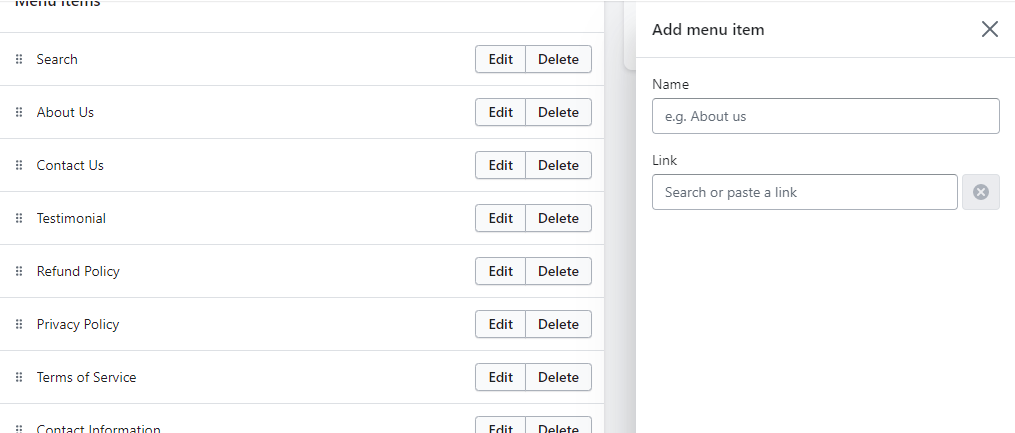
For adding the sub-menu links head towards backend of your store-> Online Store-> Navigation-> Footer and add the links there.
In the above attached Screenshots you can see how and where to add links.
These are the only ways to add the menu to your footer of your website.
And even if the problem occurs then feel free to contact us.
If solution helped then mark it as accepted.
Let me know if need further assistance
Regards,
Artzen Technologies
Hi @Asoufia
I hope you are doing good and welcome to the Shopify Community!
I am San from MS Web Designer.
To add a menu to the footer section of the Shopify Craft Theme, follow these steps:
If you want to create a new menu specifically for the footer, you can do so by going to Online Store > Navigation in your Shopify admin. Create a new menu and add the links you want to display. Then, follow the steps above to select the new menu in the footer section of the Craft Theme.
Regards,
San