The drop down menu on my site looks like this, i want to change the width of dropdown (only equal to size of text, just like other sites)

Thanks in advance for helping me out, I’m using dawn theme and my site is dealsoye.pk
A user seeks to reduce the width of dropdown menus in the Dawn theme so they fit the text content rather than extending full-width.
Proposed Solution:
component-list-menu.css in the Assets folderdetails.header__submenu > ul { width: max-content !important; }Implementation Issues:
Outcome:
The drop down menu on my site looks like this, i want to change the width of dropdown (only equal to size of text, just like other sites)
Thanks in advance for helping me out, I’m using dawn theme and my site is dealsoye.pk
Hi @am_i_abdullah ,
This is Kate from PageFly - Landing page builder, I’d like to suggest this idea:
Step 1: Go to Online Store->Theme->Edit code
Step 2: Asset->/component-list-menu.css->paste below code at the bottom of the file:
.js details>.header__submenu {
    width: max-content !important;
}
I hope it would help you
Best regards,
Kate | PageFly
there’s no file named theme.scss.liquid
not working
@LitCommerce kindly help me
Hi @am_i_abdullah ,
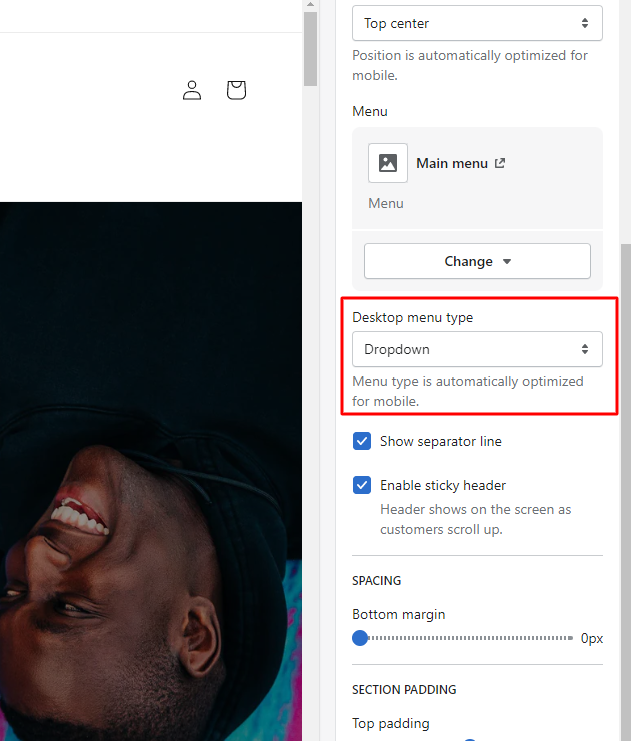
Please go to Customize > Sections > Header > Desktop menu type.
you can change it here, it will display fine
Thanks Kate, this worked well!
it worked thanks! theme Craft