how to limit the drop down width in dawn theme on my header

Topic summary

  • Issue: In Shopify’s Dawn theme v15.1, the header drop-down menu expands to full page width. The goal was to limit its width and have the menu align directly under its parent title rather than left-aligned.

  • Context: The poster shared images illustrating (1) a desired narrow drop-down example, (2) their current full-width menu, and (3) the desired alignment under the title. Images are central to understanding the visual change desired.

  • Attempts: Adjustments through the theme’s Customize editor did not solve the width or alignment.

  • Update/Outcome: The original poster later reported “Found it!” indicating they solved the issue on their own.

  • Status: Resolved for the poster, but no solution details, code, or steps were provided. No disagreements or alternative approaches were discussed; key implementation specifics remain unspecified for others seeking the same change.

Summarized with AI on December 14. AI used: gpt-5.

Hello everyone,

I’m trying to modify the width of my drop down menu so it doesn’t take the whole page like in the following exemple.
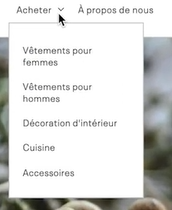
So far, it takes the whole page and i don’t really like it.

I would like to be align too with the title of the drop down and not always on the left. (see picture below)

I’m currently using dawn theme V15.1 and tried to modify through the customize menu but without success so far.

Let me know if you have any solutions for these 2 problems.

Many thanks.

Found it !