How can I change swatch title from 'colour' to 'metal' without altering images?

Hi,

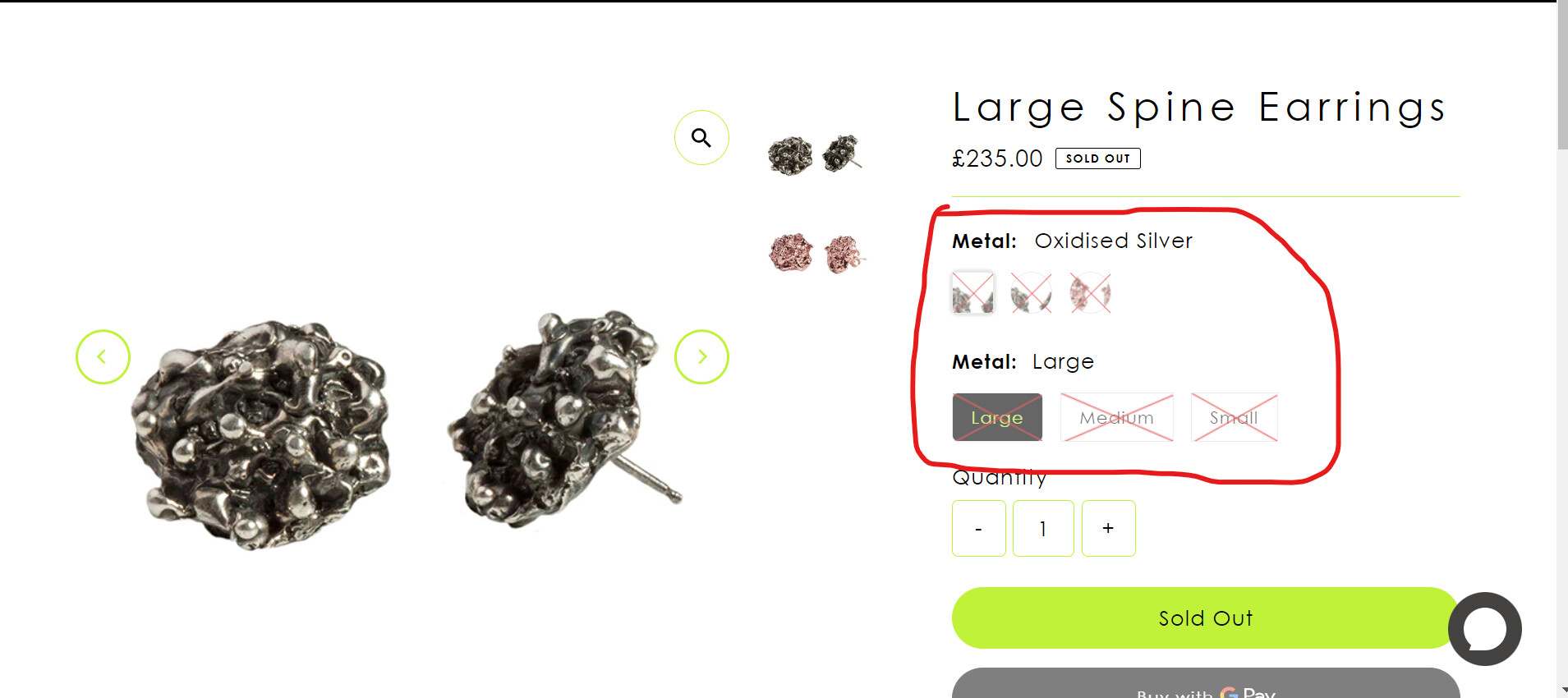
I wanted to change the title of the swatches. At the minute its “colour” but I wanted to change it to “metal” but when I change it to “metal” via the variants on the products page, the swatches of the images changes to written, which I don’t want. I want the title to be “Metal” but with the image swatches.

Here’s a screenshot of what i mean:

Hi @Ess91 ,

Could you please share URL and your store password if it enabled? So that we can help you.
Thank you.

https://1z8nhqck8djitpie-13358647.shopifypreview.com

Hi @Ess91 ,

This is Victor from PageFly - Landing page builder, I’d like to suggest this idea:

Step 1. Go to Online Store → Theme → Edit code
Step 2. Open your theme.liquid theme file
Step 3. Paste below code before :


Hope my answer will help you.

Best regards,

Victor | PageFly

That worked perfectly!

Thank you so much.

Hi, sorry.

Just wanted to ask. Is there anyway of targeting just the first variant and not the others being affected. As the change in title for just the first variant has also affected the second variant. I just want the first variant to have the “metal” and the second variant to have “size”.

This code not working ,please provide the correct code.

i want here only ,when click color swatch then change the title of the product.

this is booster theme.