How do I reduce the font size of my product titles and also my descriptions under my products in the code? my site is safekeychains.com
@shopsk100 - add this css to the very end of your base.css file and check, adjust numbers 2 and 14 as per the need
.product__title{font-size: calc(var(--font-heading-scale) * 2rem);}

.product__description{font-size:14px;}

how do i change the product title size more?
@shopsk100 - add this and change as per the need
.product__title{font-size:16px;}
Hi @shopsk100 ,
Glad to support you today.
You can check out my suggestion below to get your concern resolved.
- Go to Edit code on Online Store:
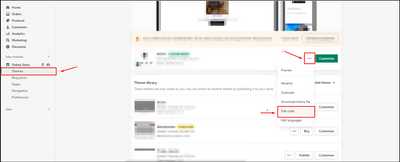
- add my code above the tag on Theme.liquid:
I hope you find the answer helpful.
Kind & Best regards,
GemPages Support Team.
Hi @shopsk100
This is Victor from PageFly - Shopify Page Builder App, I’d like to suggest this idea:
Online Store ->Theme ->Edit code
Assets ->Section-main-product.css
.product__title>h1 {
    font-size: 50px !important;
}
.product__description{
   font-size: 18px !important;
}
Hope you find my answer helpful!
Best regards,
Victor | PageFly