Hello, does anyone know how to edit sitemap.xml? I’ve read a post that we can edit it through FTP (https://www.websitebuilderinsider.com/how-do-i-update-my-sitemap-on-shopify/#:~:text=Updating%20your%20sitemap%20through%20the,reflected%20in%20your%20sitemap%20automatically)). However, I can see posts that we can’t access shopify server with FTP. I’m quite confused on which to believe. Thank you
Topic summary
Core Issue:
Shopify automatically generates sitemap.xml files that cannot be directly edited via FTP or other traditional methods, as users don’t have server-level access to Shopify’s infrastructure.
Problem Context:
Some users discovered their auto-generated sitemaps contain spam URLs added by malicious bots, negatively impacting Google rankings and search console performance. Screenshots show Google stopped indexing bad content but rankings still suffered.
Confirmed Workaround Solution:
- Upload custom sitemap file to Shopify Files (generates a cdn.shopify.com URL)
- Create a hidden page on your domain (e.g., /pages/mydomain-sitemap)
- Set up a URL redirect pointing from the hidden page to the CDN-hosted sitemap file
- Submit the redirect URL to Google Search Console as your sitemap
Important Notes:
- Redirects only work when the “Redirect From” page is set to hidden/non-existent
- Some users needed Cloudflare reverse proxy with origin-to-origin configuration for this approach
- Alternative: Use SEO hidden metafields to exclude specific pages/products from auto-generated sitemaps
- The default Shopify sitemap remains unchanged but custom sitemaps can supplement it
1 Like
I think, we can’t edit sitemap.xml file, it will be default provided by shopify. You can access it via your-domain.myshopify.com/sitemap.xml or your-base-url/sitemap.xml
1 Like
Just learned the sitemap generated in my store includes spam urls that were added by malicious bot. So thinking I will create my own tidy clean sitemap. But how to create in xml format. Then can I replace mystore.com/sitemap.xml. File?
Same here, any clue what to do with this?
Don’t know. All i do know is that my Google ranking has dropped considerably . Screenshots from our Google console. At least Google stopped indexing bad content. But still affects ranking.
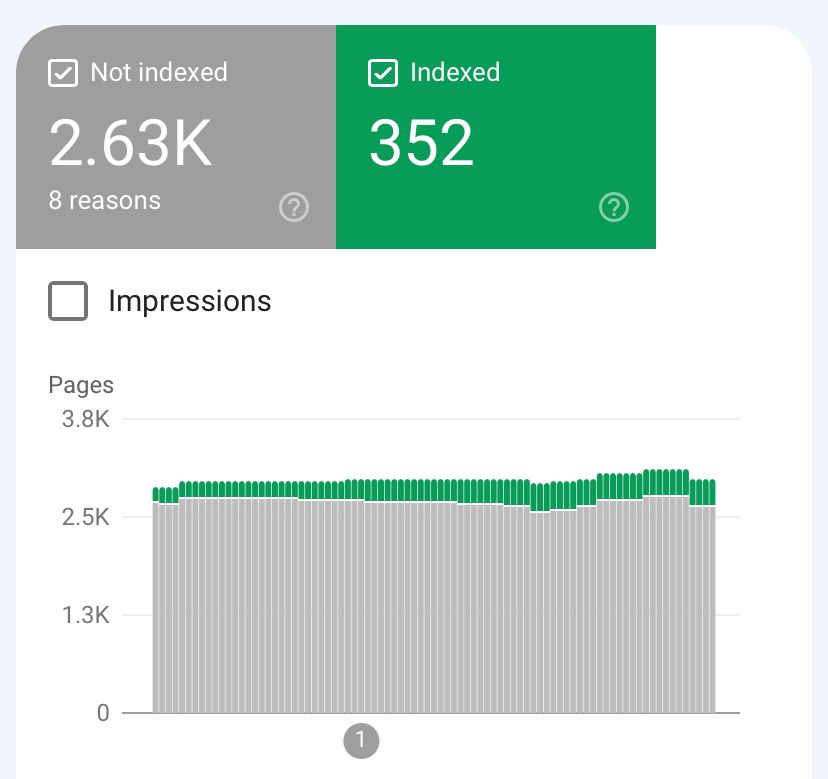

1 Like
** We came up with a workaround! ** Search engines look for a sitemap.xml in your root folder, as does Google. But with Google, you can enter a sitemap at any URL on your domain.
- Upload your desired sitemap (or sitemaps) to Files
- Copy the URL of that file upload
- Create a URL Redirect with whatever path you want (/sitemap/ ?) and point that to the URL of the uploaded file
- Submit the redirect to Google as your sitemap
This worked perfectly for us, with bumped rankings for the level of specificity we got with our tailored sitemap.
@JMont
You still cannot replace the existing sitemap but you can make a strong sitemap that may reduce the impact of any bad URLs added. Or take advantage of those URLs to redirect to good pages on your site, though not sure the impact if you can’t change the canonical URL for the bad URLs inserted.
1 Like
Hi @danafleur
Thanks for your suggestion.
We did upload the sitemap to Files, and got a Shopify CDN link.
How do I create a redirect from Shopify Domain to a page of my website, which google would crawl ultimately?
As the file uploaded is hosted on Shopify domain; i am not able to create a URL Diredirect.
I utilized this same solution, and ended up using a reverse proxy (Cloudflare) to setup the redirect.
Be aware that if you go the Cloudflare route, you’ll need to request origin-to-origin from their team, or otherwise this won’t work.
@dev-kriya If you’re using Shopify for your storefront, go to Online Store → Navigation → View URL redirects (link at top right). From there you can create a redirect.

Thanks for the suggestion. Will explore the solution.
Thanks, however the “files uploaded” in Shopify are hosted in shopify CDN domain - cdn.shopify.com & have a link of the form - https://cdn.shopify.com/s/files/1/0650/9730/2237/files/{{file_name}}
Shopify does not allows to create URL redirect for this. This only works if both the links are under my domain, right? @danafleur
It shouldn’t be a problem that it’s a different domain. We did the
following:
- Upload the file to get the URL like yours:
https://cdn.shopify.com/s/files/1/0650/9730/2237/files/{{file_name}} - Create a page on main domain, say www.mydomain.com/pages/mydomain-sitemap
and set it to HIDDEN - Create a new redirect where the Redirect From is the Shopify page
and the Redirect To is the file on the Shopify CDN
Note that a redirect will only work if the Redirect From page does not
exist, which is why you must set the page to hidden
[image: Screen Shot 2024-04-11 at 10.43.39 AM.png]
Another workaround is to use the SEO hidden metafield to hide pages (page, product, collection) from search. It also removes it from the sitemap.