I have searched the similar question in the community. The answer is to edit the store theme code. I have tried to follow the instruction, but I have no experience in code editing.
I am using the theme ‘Dawn’. Does anyone know where to edit the code? I am following the link on this page: https://shopify.dev/themes/navigation-search/search but still have no idea where to add the code.
This is flareAI: your Fully Automated Free Sales Machine. I hope you’re having a good day. flareAI is helping lots of successful Shopify stores generate $5+ million in sales from Google Search, on autopilot.
If my suggestions is helpful to you, please let me know by giving a like or marking it as a solution.
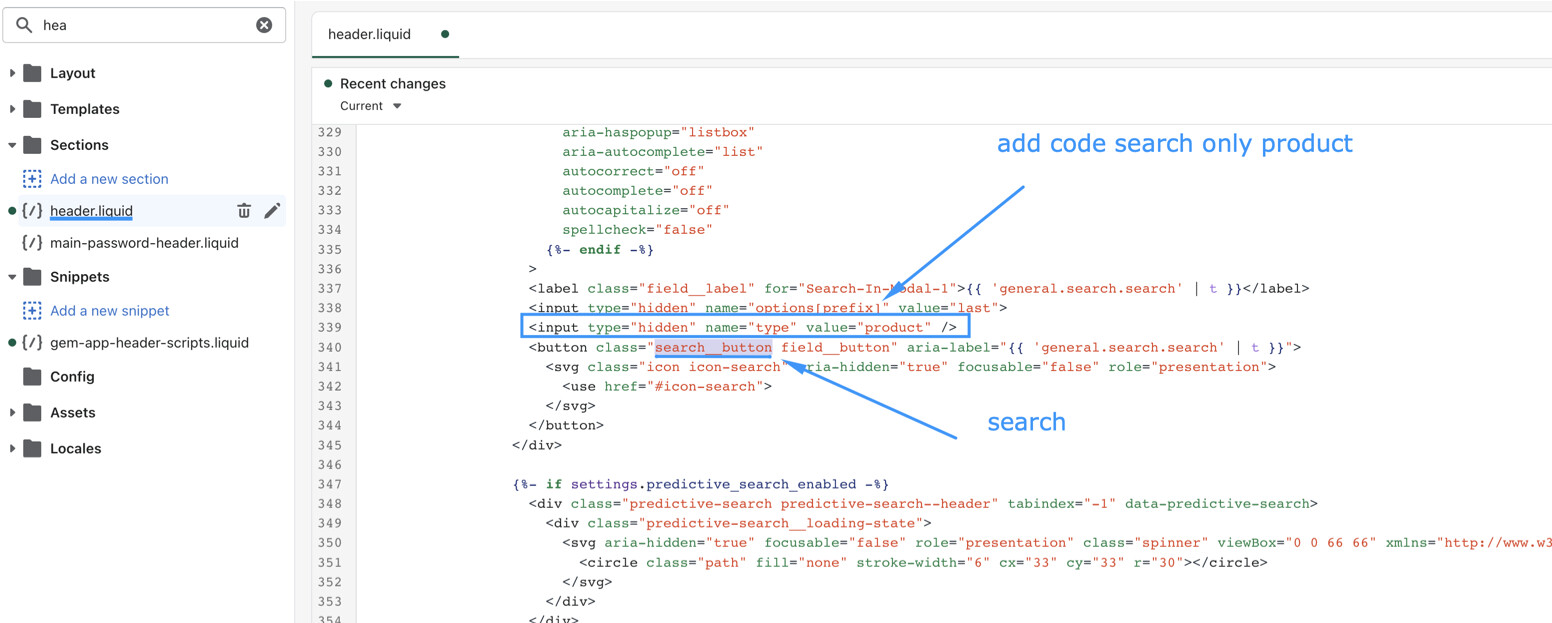
You can restrict the Shopify search to show only product pages.
To achieve a custom search, you can add a hidden field in the header.liquid file.
Go to your Online Store > Themes > Edit code > header.liquid file
Find ‘routes.search_url’ and add the hidden field inside the section.
Similarly, go to *main-search.liquid* file, find 'routes.search_url' and add a hidden field there also:

```markup

This will restrict giving only product pages in the storefront search result.

You can read [this blog](https://www.shopify.com/in/partners/blog/custom-search) for more details.

Hope this helps,

Gina
[flareAI](https://apps.shopify.com/flareai-seo)
Question - what line did you replace or add that code you posted in? Still having trouble removing only blog/press posts from my site. Thanks for your help, it would be much appreciated!
I hope this helps, dawn theme, install “Search & Discovery” - it’s completely free, from search and discovery app go to Settings and uncheck “Blog” in what to include in the in-search. like so: