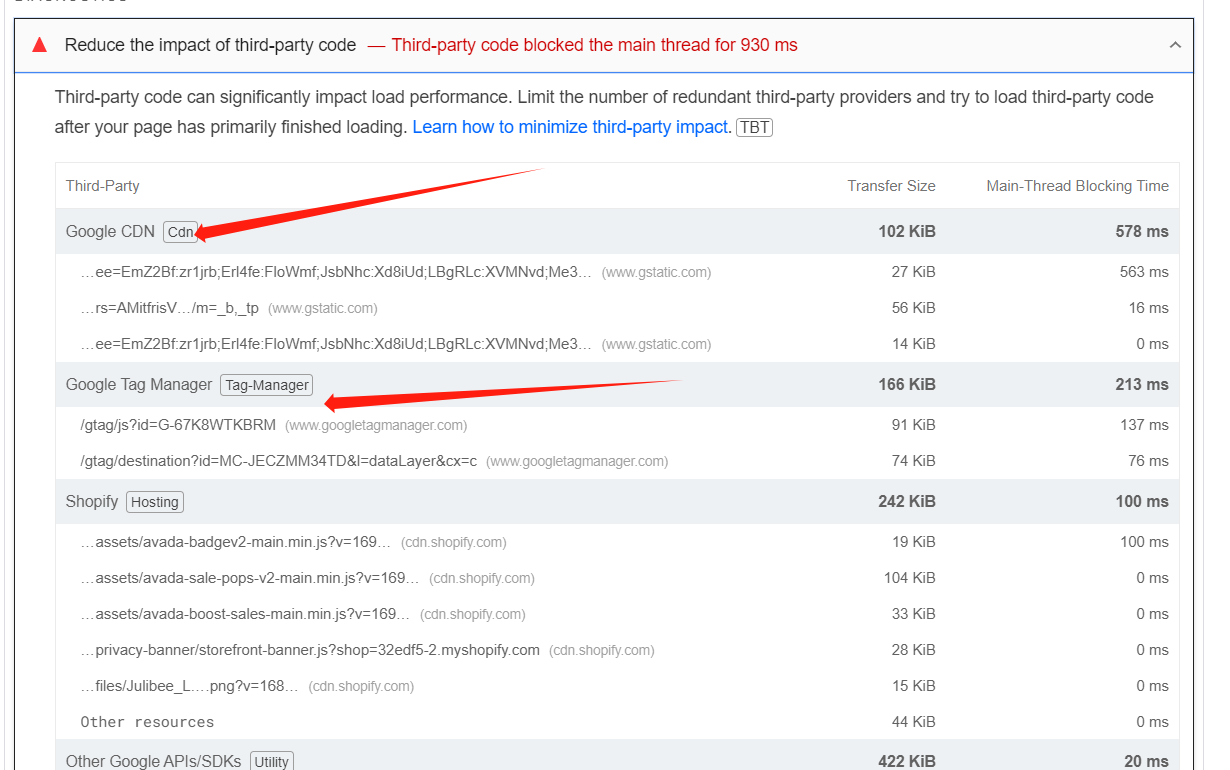
A user discovered that Google-related code (Google Tag Manager, Google CDN, and other Google APIs/SDKs) is significantly slowing down their website, causing unused JavaScript issues and blocking the main thread for 930ms.
Proposed Solution:
One community member suggested adding preconnect link tags to the theme.liquid file (between <head> and </head>) for:
This aims to establish early connections to these domains.
Current Status:
The discussion remains open with mixed clarity. While the original poster expressed interest in trying the solution, questions arose about:
Exact placement of the code
Whether users can do anything if they need Google Ads or GA4 for conversion tracking
Effectiveness of the proposed fix
Another user confirmed experiencing similar issues with Google Tag Manager blocking execution for about half a second, despite only setting it up through the “Google & YouTube” Sales Channel with no custom pixels or theme code references. A developer expressed doubt about whether the suggested fix would work, and the responder clarified they were only confirming the issue, not offering a definitive solution.
Summarized with AI on November 4.
AI used: claude-sonnet-4-5-20250929.
Similarly for us, gtag (Google Tag Manager) is the biggest third party offender in terms of blocking execution (taking about half a second) as reported by PageSpeed.
I downloaded the theme to be sure and there’s no reference in code.
We have no Custom Pixels.
We only set it up through the “Google & Youtube” Sales Channel.
Hello Denis. I think you might be misinterpreting my comment. I am not offering any fix or workaround. I am simply confirming the issue with additional context and information.