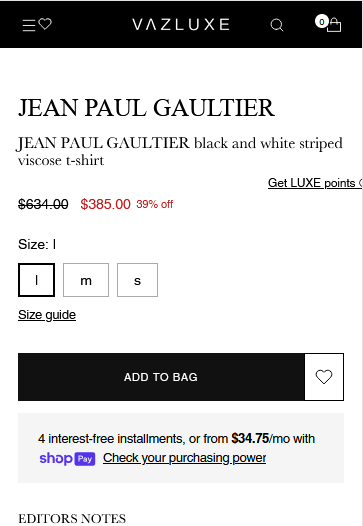
Hi,
now I need to move my size guide etc up. My site is : https://vazluxe.com/products/jean-paul-gaultier-black-and-white-striped-viscose-t-shirt-251a54dts000001-0100
A user seeks to reposition their size guide and buttons higher on their product page. The discussion remains open with multiple proposed solutions:
CSS-based approaches:
margin-top: -50px) to .js-enabled.product__option in theme.liquidmargin-bottom: 0px !important for .product__block--product-header and .product__block.product__block--medium in theme.cssBoth solutions involve editing theme files through the Shopify admin (Online Store → Themes → Edit Code).
App-based alternative:
Screenshots demonstrate the current layout issue and expected results. No confirmation yet on which solution the original poster has implemented or whether the issue is resolved.
Hi,
now I need to move my size guide etc up. My site is : https://vazluxe.com/products/jean-paul-gaultier-black-and-white-striped-viscose-t-shirt-251a54dts000001-0100
.js-enabled.product__option {
    margin-top: -50px;
}
Go to online store ----> themes ----> go to three Dots ----> edit code ---->find theme.liquid files ----> place the code ---->
under the tag before the body ----->
if this code work please do not forget to like and mark it solution
HEllo @Luxurymrkt
Go to online store ----> themes ----> actions ----> edit code ----> theme.css
add this code at the end of the file and save.
.product__block--product-header {
margin-bottom: 0px !important;
}
.product__block.product__block--medium {
margin-bottom: 0px !important;
}
Result
If this was helpful, hit the like button and accept the solution.
Thanks
Hi @Luxurymrkt
If you’re looking for a way to move your size guide higher on the page, you can adjust it through your theme settings or code. However, if you’re interested in an app, I recommend Easify Product Options—it’s an easy, no-code solution that lets you customize your product pages effortlessly. Here’s how it works:
This app is simple to set up, and I hope you check it out. Let me know or reach out to Easify if you need any support!