Goal: show product reviews in the correct language on a multilingual Shopify store translated with Translate & Adapt (Shopify’s built‑in translation app) while using Judge.me (reviews app).
Current issue: no clear, native way to auto-translate new reviews across all languages and display them per locale with Translate & Adapt alone. Another user reports the same need and seeks a reviews-only translation solution.
Latest update/workaround:
Use Langify (translation app) alongside Translate & Adapt.
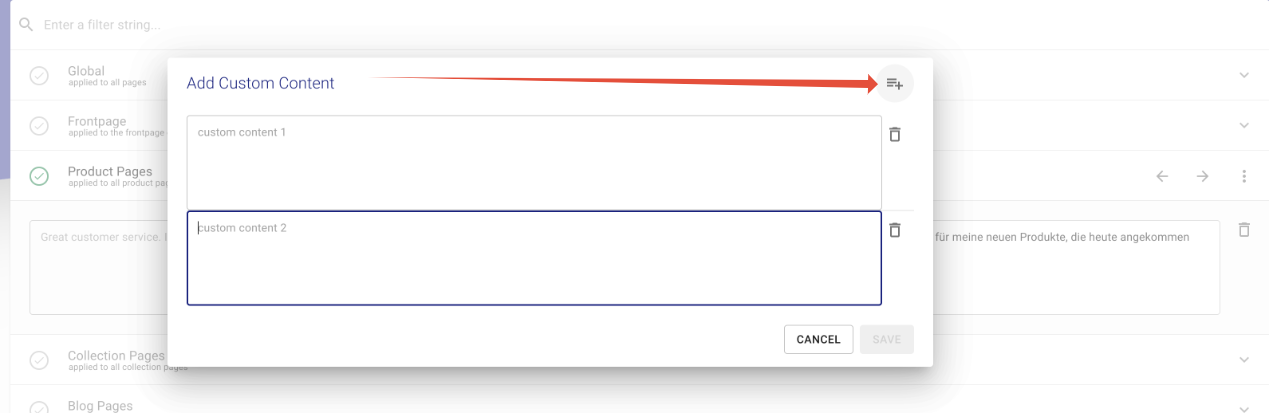
Process: add each review’s text under Langify → Custom → Product Pages, then click auto‑translate; translated content appears when switching languages. Screenshots provided are central to understanding the steps.
Limitations:
Manual step required: each review must be added as custom content before auto‑translation; no fully automatic sync for new reviews is described.
No direct compatibility confirmation between Translate & Adapt and review apps for automatic review translation.
Status: partially addressed via Langify workaround; a fully automated, native solution remains unresolved.
I translated my store with Translate & Adapt by Shopify into 10 languages.
I have judge.me review app installed before (to capture german reviews). Now i am struggeling on how to show the correct languages to the different sites for my reviews.
Idealy when a new review comes in it gets auto-translated to all other languages and displays there correctly.
I looked now for quite some time to find a review app which is compatible with translate & adapt, but unfortunately i had no luck so far…
Did anyone deal with the same problem here? Would really be beneficial to show reviews in the correct language.
I have this problem too! any update on your side? I’m trying to find a translation app that can work alongside Translate & adapt and use it just for the reviews.
Please note that once you’ve added at least one custom content to e.g. Langify → Custom → Product Pages you’d have to click on the three-dot icon on the top right to add more custom content if you want to do so: