Hey everyone,
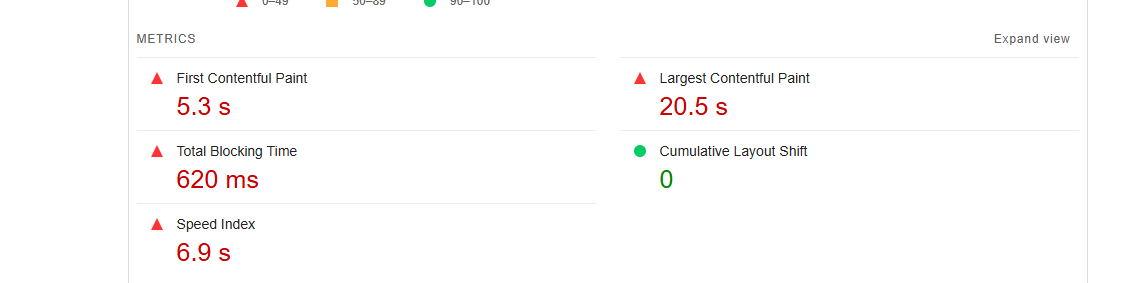
I am looking to improve my page speed results here are my results so far:
I am a bit confused with everything, for example with redirects I have removed all redirects to the home page but the result has not changed?
I’ve also tried fixing the LCP error but haven’t gotten very far with it, only change that I made that reduced it a little bit was compressing the jpg of the hero banner.
I would love some guidance/assistance with this, thank you!
Hi @StreamShopAU
Can you share with me your store URL to investigate further on your optimization?
Thank you
Apologies for the delayed response, the url is: streamshopau.com
Thank you so much for the comprehensive answer, will go through the first through suggestions. Saw a few videos on the lazy loading but was unable to add the code in, every time I attempted to do so I would get errors.
Yes please that would be amazing I really appreciate it, I’ve looked at a few tutorials and they were able to just add the code loading: “lazy” to the page but in the place where they add this I have the code fetch_priority: fetch_priority so not sure what to do. Or even if I am in the right place.
Hi @StreamShopAU ,
Key Fixes for Better Page Speed
1 Fix Redirects – Remove unnecessary redirects in Shopify Admin > Navigation > URL Redirects.
2 Optimize LCP (20.5s) – Convert the hero image to WebP, preload it, and enable lazy loading for other images.
3 Reduce JavaScript Blocking (4.5s) – Defer non-essential scripts (async/defer), remove unused apps, and minify JS.
4 Fix Third-Party Delays (7.1s) – Optimize tracking scripts (use Google Tag Manager), remove extra widgets, and load chatbots after page load.
I recommend considering newer image formats such as W-ebP instead of JPG, as We-bP generally provides better compression with minimal loss in image quality. Additionally, implementing lazy loading for images—especially those not immediately visible on the page (below the fold)—can help improve page speed. Shopify offers apps and tools that may assist with this, or you can make adjustments through the code itself. It’s also important to ensure the hero banner image is optimized and not too large. You can use a smaller, more efficient version for mobile devices to improve performance.
Regarding redirects, it’s possible that server-side or app-generated redirects could be affecting performance. It might be helpful to check if apps or Shopify’s own redirects are adding unnecessary load. You can use Shopify’s “Redirects” feature to review and remove any unnecessary redirects from your site.