Good day guys! I need help with personalizing a product that should only be in the products section. It looks approximately the same as in the pictures I have attached. I also looked at certain applications that can be downloaded, but they are quite expensive. If he has a similar experience or if he knows how to solve the problem,thank you in advance! https://www.americaandbeyond.com/products/african-safari-embellished-tote?_pos=1&_psq=safa&_ss=e&_v=1.0&variant=44651708088510
Topic summary
A user is implementing a product personalization feature (text input field) on their Shopify store, similar to a reference example showing customizable embroidered tote bags.
Progress made:
- Initially searched for
product-template.liquidorproduct-form.liquidfiles but couldn’t locate them - Successfully found
main-product.liquidfile instead - Implemented the personalization feature, which now properly connects to orders and cart functionality
Current challenge:
- Seeking guidance on how to limit the number of characters/letters that can be entered in the personalization text field
Context:
- Explored third-party apps but found them too expensive
- Looking for a custom code solution for the product page
- Attached screenshots show the desired personalization interface


I cant find product-template.liquid or product-form.liquid should I add it manually in the sections or template as a new liquid folder or?
okey l found main-product.liquid
It is perfectly connected to the order and the cart works great! Only if you have time how can I limit the number of letters that can be entered?

Hi @Stupanj 
With Easify Product Options, we can fully support the exact same product personalization flow shown in the demo you’re viewing—including allowing customers to enter embroidery text, choose a font, select the thread color, and automatically add the embroidery fee to the product’s total price.
Here’s an example I’ve created so you can see how it works:
- This is the result:

- This is the app setting:

Specifically, you just need to keep the tote product in Shopify as a normal product. Then, in Easify Product Options, create an Option Set and assign it to this product so it can handle the entire personalization flow displayed on the product page.

In the Option Set, you can add an Embroidery option as a dropdown or buttons so customers can choose whether they want embroidery. For the embroidery choice, you can select and link the add-on product for each item just like in the demo - when customers select this option, the price will automatically be added to the total shown right below.
Next, add a Text field option for customers to enter the name or text to be embroidered. This option can be set up to display exactly like the “Name / Text to be embroidered” section in your demo, and you can also limit the number of characters by enabling Character count and setting the minimum and maximum allowed characters.

Then, you can continue by creating Font and Thread color options as buttons or image swatches. These choices help customers clearly visualize the embroidery style, and all selected details will be saved in the order and shown clearly in both the cart and the order admin.
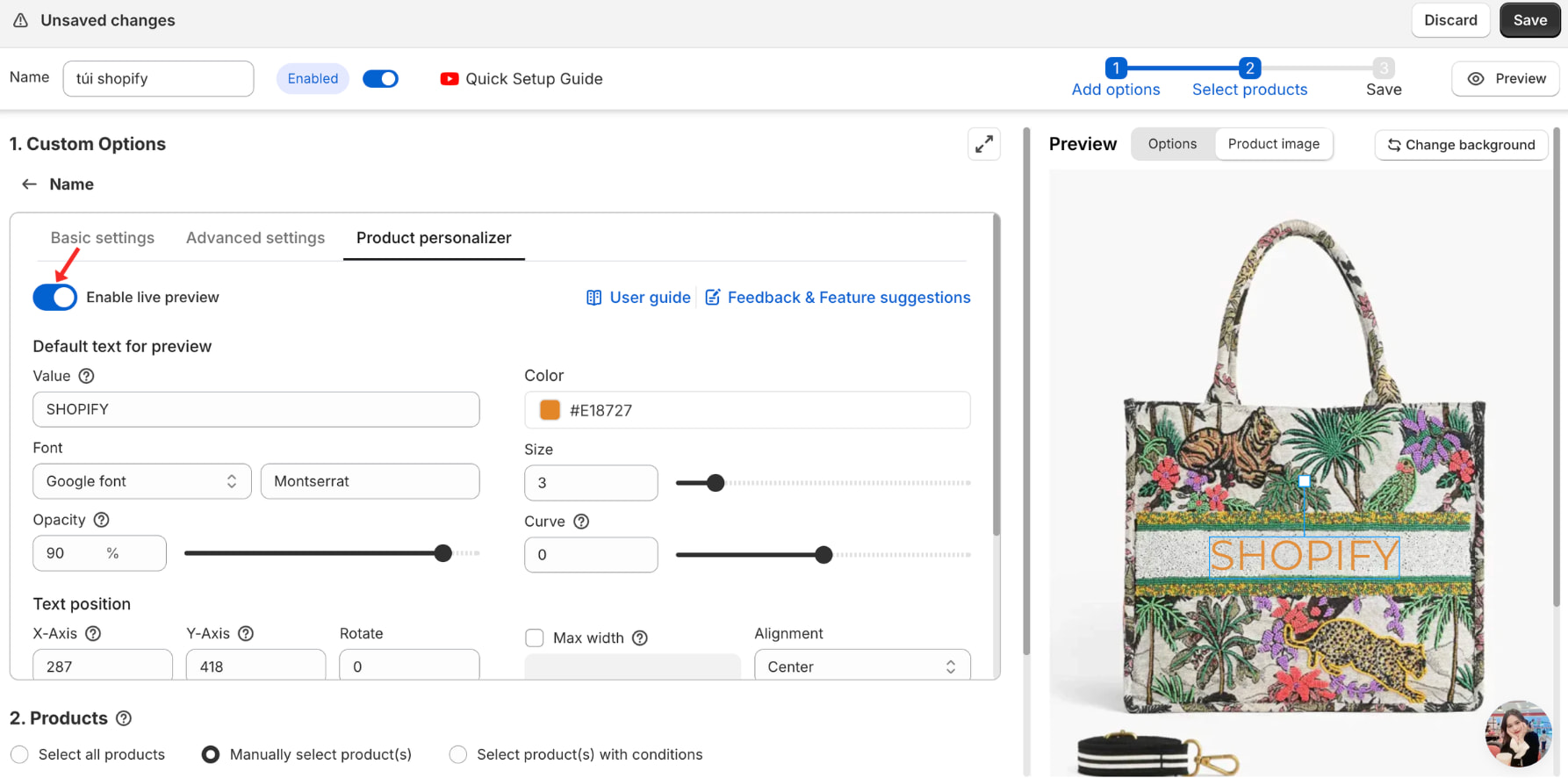
In short, the full personalization experience from your demo—choosing embroidery, entering text, selecting a font, selecting the thread color, and automatic pricing—can be done entirely with Easify Product Options, with no theme code edits and no need for complex, expensive personalization apps. To show a live preview, simply go to Product Personalizer and turn on Enable live preview.
The app combines simplicity with reliability, making it perfect for personalized products. And if you run into any issues, Easify’s support team is fantastic!