Topic summary
A user encounters an error stating their phone number is already registered when attempting to create or access a Shopify store. The support representative suggests this indicates a previous store was created using that phone number.
Recommended solutions:
- Reset the forgotten password via Shopify’s login page
- Enter the admin email address and select “Forgot password”
- Alternatively, skip the phone number field during signup (it’s optional)
- Once logged in, update store details including phone number through Settings > General
The user confirms they likely created an account previously and needs to reactivate it while maintaining the same phone number as their primary contact. The issue remains in progress as the user attempts the password reset process.
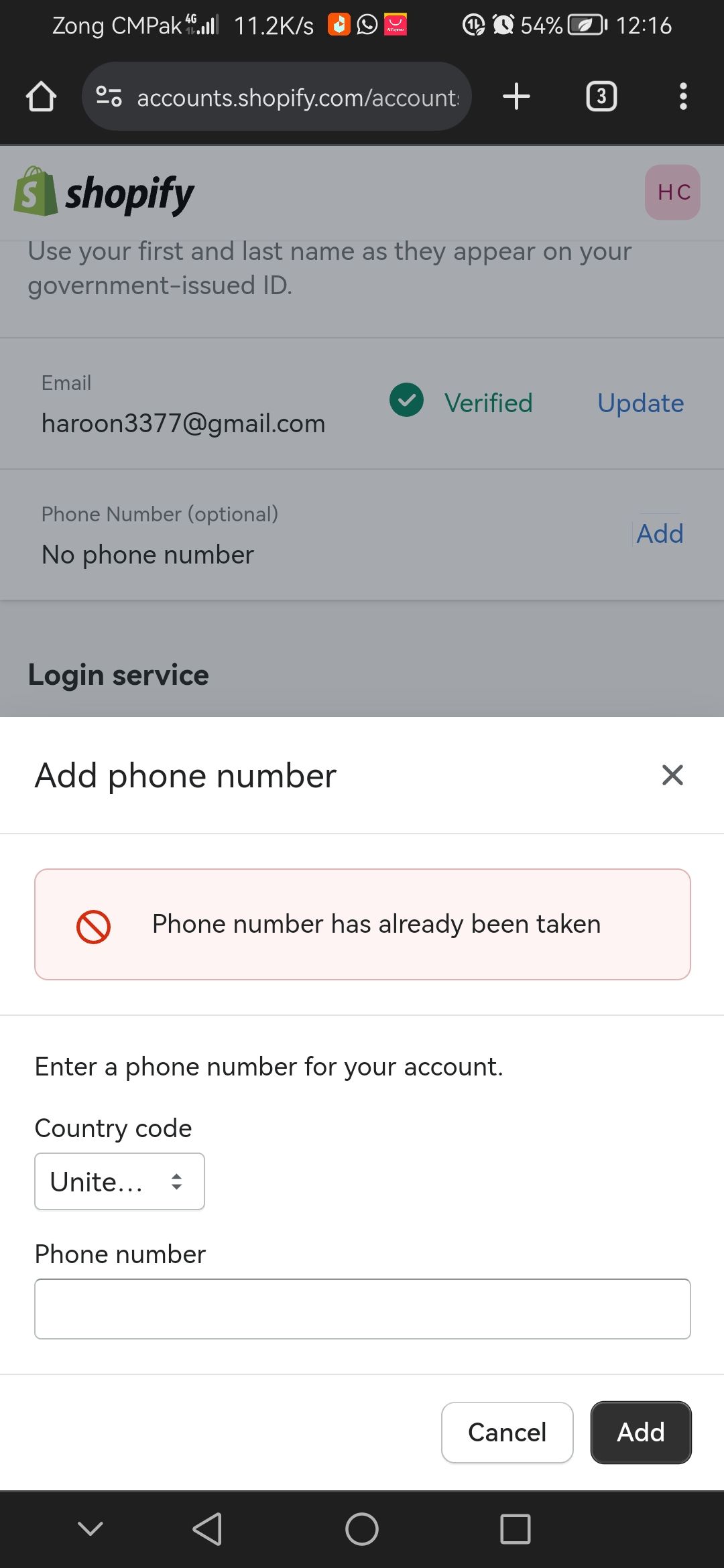
Hey @haroonzia .
Thanks for reaching out.
I appreciate that you have included a screenshot of the error you are receiving as that is helpful. Did you happen to create a previous Shopify store using the phone number? I am just trying to get a better understanding of the situation so I can assist you further. You could potentially skip the phone number as the field is Optional.
Looking forward to your response.
Thank you for the response. Yes, I think I tried way back. How to reactivate the same account with the same phone number..?
I’ll also try to login in without phone but I’ll be needing to update the same phone number as this is my primary phone.
Hey @haroonzia .
Thanks for following up.
If you suspect that you may have previously created a Shopify store, I would suggest attempting to Reset your forgotten password by navigating to our login page. You can type in the admin email address and select the option Forgot password.
You can also update the store details by navigating to Settings > General.
Let me know if that does the trick and if you have any questions.