Removal of Residual Data - Amazon MCF and Buy with Prime

Topic summary

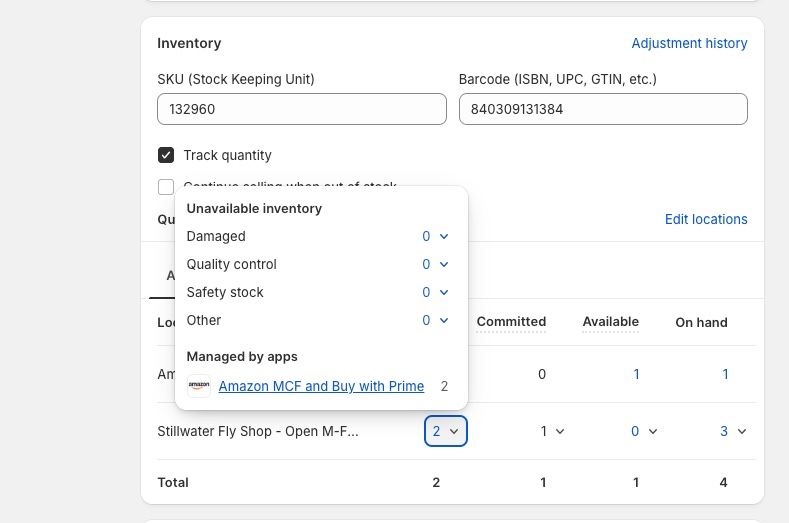
A user encountered residual data issues after uninstalling the Amazon MCF (Multi-Channel Fulfillment) and Buy with Prime app from their Shopify store, as shown in a screenshot they provided.

Suggested troubleshooting steps included:

  • Contacting the app developer directly for official removal instructions
  • Checking Shopify’s Locations settings for any remaining fulfillment locations that weren’t automatically removed
  • Reviewing and removing any theme code modifications made during installation

Resolution: The issue was resolved by reinstalling the app and then uninstalling it again, which properly cleared the residual data.

Summarized with AI on October 28. AI used: claude-sonnet-4-5-20250929.

Does anyone have experience with removing residual data from the Amazon MCF and Buy with Prime App? See the screenshot for reference.
I would contact the app directly for exact instructions. But taking a guess, this may work:

  1. Uninstall the app

  2. Go to Locations in your Shopify settings and see if there are any straggler locations you need to remove (they’re usually automatically removed if you uninstall the app, but check just in case)

  3. If there was any change to your theme code, then remove that (you could look at their installation instructions if you don’t recall the code changed)

Solution was to reinstall and then uninstall again…