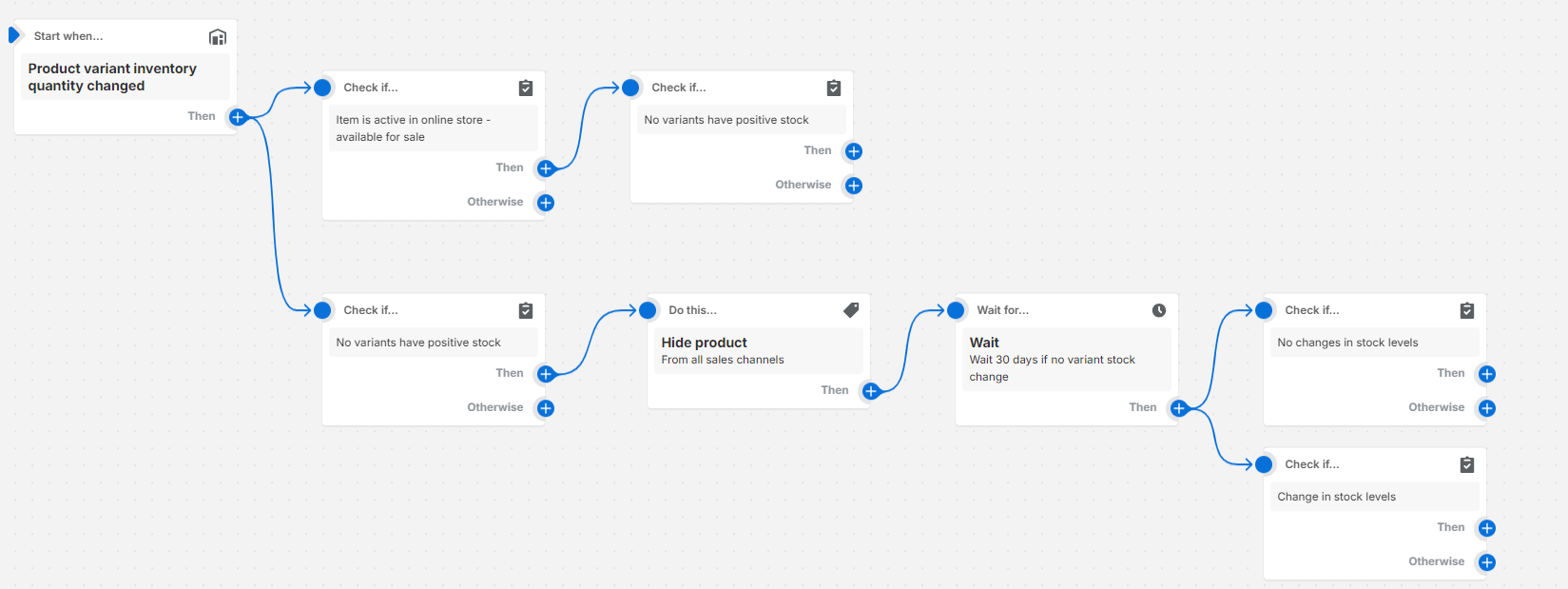
We have a website that we use scheduled products to upload when they are released. We also use the sales channels - active, as our way of showing what items need to be on the website (so all products including non–live products are technically active in the backend)
We need an out of stock flow that won’t impact the scheduled products, or incorrectly remove items.
This is the current idea we are working with, to remove variants that are active + included in online store, no variants have stock.
We also sometimes have the issue where items come back into stock in a restock, can we do this all in one flow?
It’s a bit unclear what you are looking to achieve. I think you are trying to publish or unpublish the product all changes when it’s back in stock or out of stock, respectively. It’s also not clear if sometimes you might remove a product from the store even if it has inventory (if so you need to be careful about doing something on ever stock change).
Making some assumptions, one problem is that you won’t know if the product was already out of stock (or already in stock), because the trigger only tells you for a single variant. So I think you likely want to use tags or metafields here to flag something as out of stock or in stock. The workflow would look something like:
Inv qty changed trigger
Condition: if all variants are out of stock
True:
Condition: If none of tags is equal to “no-stock”
- Add “no-stock” product tag
- Unpublish from store
False:
If none of tags = “in-stock”
- Add “in-stock” product tag
- Publish product