How to identify if a theme is a Shopify 2.0 theme? Is Maranello a Shopify 2.0 theme?
Topic summary
The discussion addresses how to identify whether a theme is Shopify 2.0 compatible, with specific focus on the Marellana theme.
Key identification methods:
- Check if an “add a section” option appears in the sidebar of the theme editor
- Navigate to Online Store > Themes > Edit code and examine the Templates folder
- If all template files use
.jsonformat (rather than.liquid), the theme is Shopify 2.0
Core feature:
Shopify 2.0’s major update is “Sections Everywhere,” which allows sections to be added throughout the entire site, not just the homepage.
Marellana theme status:
One respondent confirms that Marellana is indeed a Shopify 2.0 theme, as evidenced by its support for the sections feature. Screenshots were provided showing the interface indicators.
Hey @pprit
Simplest way would be to check if the add a section appears in your sidebar
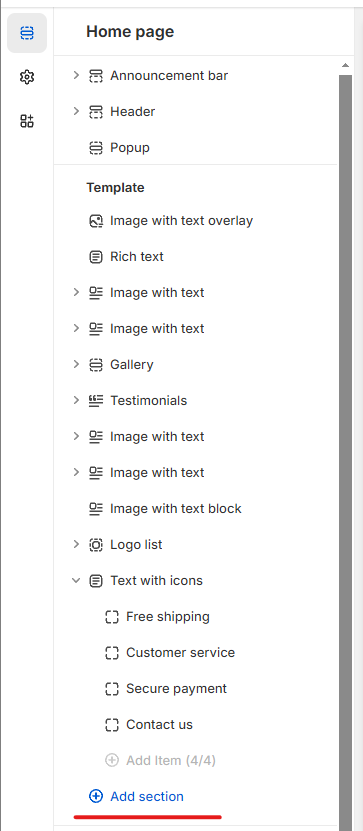
alternatively you follow the following steps
- Go to Online Store > Themes > Edit code.
- In the Templates folder of your theme, check if all your files are .json.
- If all your template files are .json, your theme is a Shopify 2.0 OS theme.
Hi @pprit ,
The major update on Shopify 2.0 is the feature called “Sections Everywhere”. You can read about it here : https://www.shopify.com/in/partners/blog/shopify-online-store
I can confirm that it is a Shopify 2.0 theme because the theme supports this feature.
Kind Regards,
Roy

