Hi, I installed Shopify’s Privacy & Compliance app, and activated the cookie consent banner, but the banner doesn’t show up publicly on my website, patrickdjoyce.com. I can only see it while logged into my account by using the “View on online store” link inside the app. Any ideas why it’s not working or how I can get it to appear? Thanks!
Topic summary
Users are experiencing issues with Shopify’s Privacy & Compliance app where the cookie consent banner fails to display on their live storefronts, despite being activated in the app settings.
Troubleshooting steps attempted:
- Verified the banner only appears when logged into the Shopify admin, not publicly
- Checked default app settings (no custom changes made)
- Tested across multiple browsers and devices
Suggested solutions:
- Check Theme Editor → App Embeds section to ensure the privacy app toggle is enabled
- One user discovered their app embed had mysteriously turned off despite previously enabling it
- Consider trying alternative privacy banner apps from the Shopify App Store
- Create a new theme version to test if the issue persists
- Contact Shopify Support directly if problems continue
Current status: The issue remains unresolved for multiple users as of June 5, 2024. At least one user confirmed the app embed was unexpectedly disabled, suggesting this may be a recurring technical glitch rather than a configuration error.
Can you post some screenshots of the app’s settings?
Hi there, thanks for replying! I tried uploading a png screenshot, but got the message “The file type (.png) is not supported. Valid file types are: csv, mp4.” (Tried a jpg also, same problem, and also tried other Mac desktop web browsers, and my phone!) Anyway, in the Privacy & Compliance app, I didn’t make any changes to the default settings after activating it. Any suggestions on either problem?
For the issue with uploading images to blog posts, it sounds like you’re clicking the video icon instead of the camera icon from the toolbar (you should definitely be able to upload .png images).
Without screenshots of how you have the app set up in the backend, I can only assume it’s using some kind of ‘test’ mode and hasn’t been fully activated yet.
If you can’t get the app you’re using to work, there are other free options on the Shopify app store to pick from: https://apps.shopify.com/search?q=privacy%20banner
On a side note though, I personally wouldn’t even add the banner though. Cookie consent is implied by using a website, and you can address this via your privacy policy page (instead of needing a banner). Also, cookies can be controlled at the browser level these days, so the banner is redundant.
Oh duh I was clicking the “Drag and drop here or browse files to attach” link! Now I see the camera icon. Here you go… (I’ll take a look at other apps too.)

Try going into your theme editor (admin > online store > themes > customize) … and then click into “app embeds” from the left-hand menu.
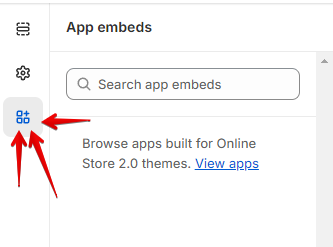
See if anything shows up here … if it does, make sure the ‘slider’ button is clicked on for your privacy app, and then save changes.
Oh weird, I remember turning it on, but now there’s no embed for the app.
It might be worth just trying a different app then.
Otherwise, you could try adding a new version of your theme to the store, and then seeing if it works (or if the embed for the app shows). If that doesn’t work, then you’d probably have to reach out to Shopify’s support directly, for further help troubleshooting.
1 Like
Same issue. I’d really like to use the shopify native app rather than layer on another app. But it just doesn’t show up.
Today is 5/6/24
1 Like