Hi all, wonder if anyone can shed light on the best practice for updating files. We have some PDFs that we’ve just begun uploading to our store, and these are product manuals or product info. So occasionally they need to be updated, and I assumed I’d be able to somehow map the link from the old one to the link to the new one so that any links out there would take viewers to the latest version of the doc. Should I just do a 301 redirect for this do you think, or is there some better way?
When I look at the Shopify documentation it just says “edit the doc, then upload it”, so I thought maybe if it had the same file name their system would recognize it and update things automatically. But it seems not, when I upload an updated doc the URL changes, but the link still takes me to the old doc, even after refreshing the page with the links:
https://cdn.shopify.com/s/files/1/0653/7868/1077/files/ToneShapers-CORE-Wiring-Diagram-HH1-VT5-Duncan.pdf?v=1665951676
https://cdn.shopify.com/s/files/1/0653/7868/1077/files/ToneShapers-CORE-Wiring-Diagram-HH1-VT5-Duncan_7e83e46e-2971-4459-b037-d0c8a4d27125.pdf?v=1666045776
I would think this is going to be an ongoing issue, just trying to get off on the right foot with the best practice here. Any help appreciated!
George
You can’t replace a file and keep the same url, as the files are distributed on a CDN.
And since it’s on a CDN I don’t think redirects are a solution.
I thought maybe if it had the same file name their system would recognize it and update things automatically
Typically not having file links update is a result of the url being hardcoded in theme, or content, as a static piece of text; Instead of being a a liquid statement to dynamically render a url in the theme using hosted file filters which do work based on the name of a file in the files admin.
I.e. cdn.shopify.com/s/files/1/0653/7868/1077/files/ToneShapers.pdf vs {{ ToneShapers.pdf | file_url }}
https://shopify.dev/api/liquid/filters#hosted_file-filters
https://shopify.dev/api/liquid/filters#file_url
When I look at the Shopify documentation it just says “edit the doc, then upload it”
Could you link to the documentation being referenced?
If you need this fixed to have dynamic links in the themes you can contact me, info in signature please provide context such as post url, store url, issue detail,etc.
1 Like
Hi Paul, thanks for the response! The reference is from this page: https://help.shopify.com/en/manual/shopify-admin/productivity-tools/file-uploads#edit-a-file
The instruction is this: If you need to make changes to an image or a document, use document editing software, and then upload the file again., which is not very helpful.
If there is a way to make these links dynamic based on the file name, that sounds interesting. I just bought you coffee, would like to discuss further.
Hey George, there is a new feature which allows you to Replace a file in-place. You can access it under the Content > Files area under the navigation.
If you click through a PDF you should see a preview modal, under the more options … menu there will be an option now to Replace that file.
Using this option will overwrite the contents of the file so any links you have to it should continue to work.
Hi Richard, I too found the method you show and tried it. I had PDF instructions that I updated and used the “replace” shown above and the old file kept showing up even after multiple refreshes. I then used the “copy” url link and compared it to the old link and the last “v” number in the CDN file had changed so it was not an edit of the original number.
I also noted here, https://help.shopify.com/en/manual/shopify-admin/productivity-tools/file-uploads, “Replace an existing file with a new file, and keep the same file name and URL handle. You can replace a file only with the same file format, such as replace a JPG file with another JPG file.” does indeed keep the original URL but the CDN link location changes when I compare so I am still struggling to find a solution for global PDF changes.
Makes me think if the PDF URL name does not change, how to access/complete the URL Shopify shows and link directly and thus skip the CDN link?
Did you ever find a Shopify solution for the PDF file replacement without affecting the URL? We too have an app that is loaded but references some Shopify uploaded PDFs. These are fluid agreements and change periodically and don’t want to have to redeploy an Singe Page App just for PDF links. Thank you.
Also struggling with this. I thought removing the ?v= parameter from all the links would allow me to effortlessly replace files themselves, without bothering with changing URLs. But apparently if you don’t use the ?v= parameter then no matter how many times you replace the file, you will forever see the first version 1. So what’s the point of replacing the file after uploading? You still have to update URLs everywhere on your site…
You still have to update URLs everywhere on your site…
Are you hardcoding the URLs into your site? Would it be possible instead to use a Liquid filter such as https://shopify.dev/docs/api/liquid/filters/asset_url to generate the URL, which would handle changing the version in the query string?
you will forever see the first version 1.
Is there an example of a URL which is not changing “forever” that I could take a look at? My hunch is that the CDN is caching the file and it will eventually update when the cache expires, if that is the case we could look into modifying how the code works such that when an update is performed the cache is automatically flushed, so it would update the URL right away.
Hi, and thanks for looking into this 
Are you hardcoding the URLs into your site? Would it be possible instead to use a Liquid filter such as https://shopify.dev/docs/api/liquid/filters/asset_url to generate the URL, which would handle changing the version in the query string?
Too technical for me here, I guess I do? In the most recent example it’s just a text block where I enter the URL via the theme editor.
Is there an example of a URL which is not changing “forever” that I could take a look at?
here’s the page in question. , left column
Basically I knew ESG report 2023 was a temporary file, so I created the link without the ?V= parameter, hoping that I can replace the PDF with the updated file soon and not have to change the URL on the page (considering I have to change it for translated pages as well, I wanted to save time).
So the URL I want is https://cdn.shopify.com/s/files/1/0834/3774/8530/files/Cardo_ESG_Report_2023.pdf at the bottom of page 38 you can see Version 1, meaning it’s an old file. It should be Version 2, which I get when I go to content > files > this file > download.
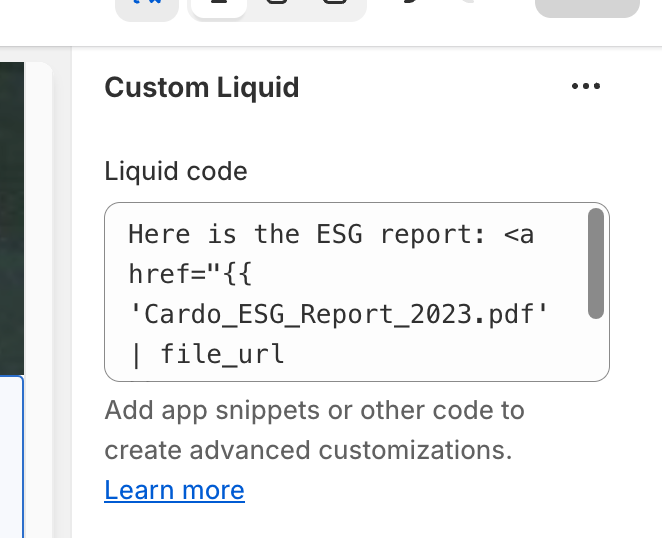
Hey BobbyMacCheese, are you able to add a “Custom Liquid” section to your theme page?
You’d add a Liquid code snippet such as:
Here is the ESG report: Cardo_ESG_Report_2023
this would take care of changing the ?v= part of the URL for you automatically
Thanks, it does work, unfortunately only for specific “custom liquid” blocks in theme editor. Is there a workaround to put liquid inside other fields, for example rich text?
And second issue is apparently custom liquid blocks can’t be translated in translate&adapt app, so file titles can’t be translated for multilingual stores.