is there a way to create a bundle with two products, where the variant that is chosen for product 1 automatically defines the variant of the second product?
For example:
Product 1: a pair of shoes, available in sizes S and L
Product 2: matching socks, also available in sizes S and L
If the customer chooses the shoes in size L, the socks in size L are automatically added.
We’re using the shopify bundles app and can’t find a way to remove the bundle variants we don’t want (e.g. shoes S & socks L, shoes L & socks S).
Would be great, if this was possible with the shopify bundles app. If not possible I would also be interested, if there is a third party app with this functionality.
Unfortunately, this functionality is too specific to be covered by a ready-made Shopify app. However, an experienced Shopify development company can easily create a custom app to meet your needs.
I recommend using the Easify Product Options app to solve your issue, no coding required . You can set up Product 1 & 2 as custom options for your bundle product. This app also offers a feature called “conditional logic” to display matching sock size based on the selected shoe size. Here’s a quick guide:
Create Product 1 & 2 (Shoes & Socks) with sizes as Shopify variants.
Configure your bundle product without any variants.
Install the Easify Product Options app and create a new option set:
 . You can set up Product 1 & 2 as custom options for your bundle product. This app also offers a feature called “conditional logic” to display matching sock size based on the selected shoe size. Here’s a quick guide:


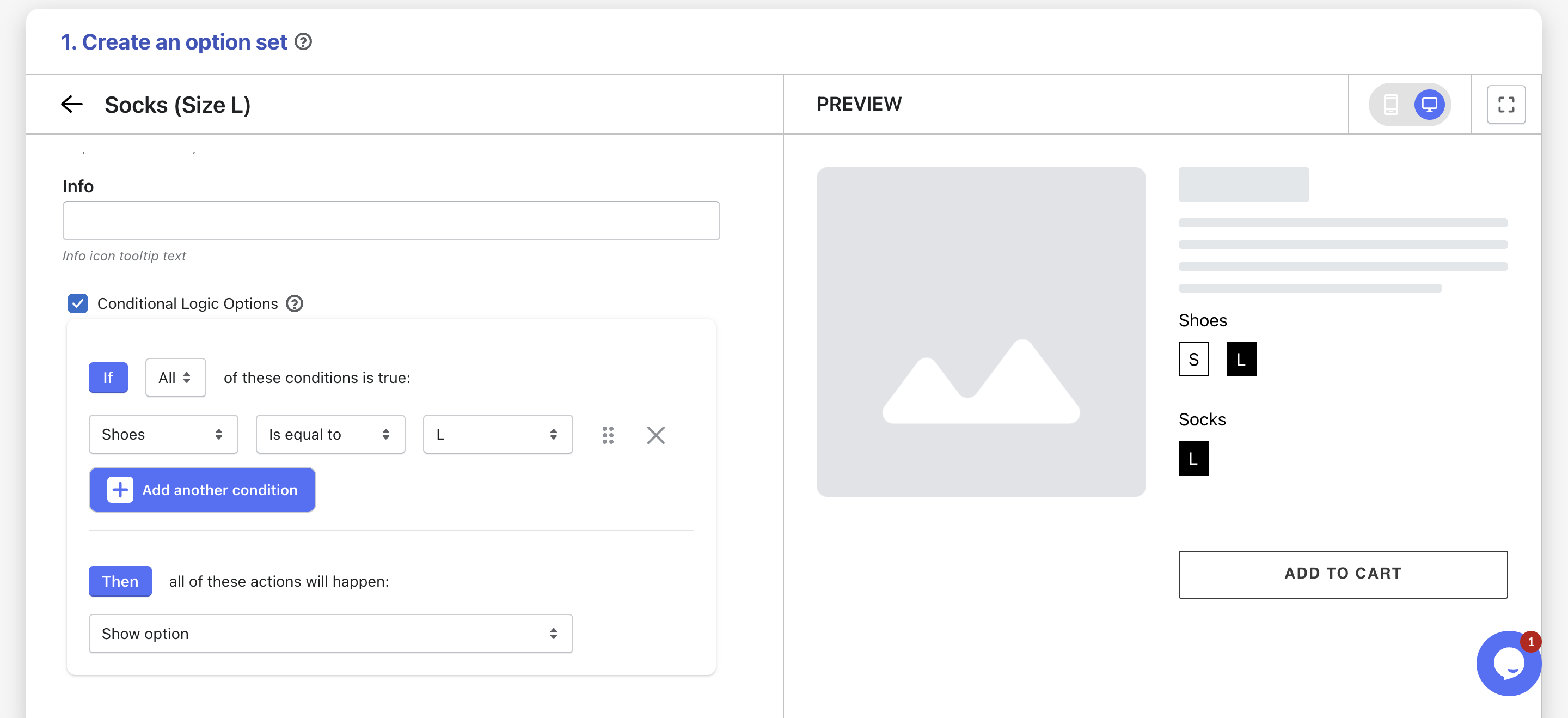

 !
!