Hi @thecornerstone ,
Thanks for reaching out to the community. This is MooseDesk - Customer Support Helpdesk/FAQ App.
Congrats on your store! Your store looks stunning. I can tell you have put a lot of effort into building this. However, I have some comments to make the good get even better. Here are some of my recommendations for better customer experience, please kindly check.
1. Add a Favicon Image
A favicon image is a small icon that appears in the browser tab. It helps users quickly identify and return to your site among multiple open tabs. Adding a favicon increases your store’s professional look and enhances brand recognition.
Here is an example for you:
2. Consider Using Another Font
The current font may be hard to read and can distract users. Opting for a more professional, cleaner font can improve readability and ensure users focus on your content.
3. Revise the Hero Banner Title and Description
The current title and description are quite generic. Consider making them more appealing and informative about your offerings and unique selling points. This change can immediately capture user interest and communicate your store’s value proposition.
You can follow this example:
4. Introduce a Product Collection Section
Displaying all products on the homepage can be overwhelming. Instead, create a product collection section with a clear call-to-action (CTA) button that links to specific collections. This layout will help users easily understand your product offerings at a glance.
You can use this layout from your store:
5. Group Sections into a Product Benefits Section
Revamp and organize sections into a dedicated product benefits section. This approach will clarify the purpose of each section, attract user attention, and encourage them to explore more of your website.
These are the sections I mention:
Fashion, the felling section
This section:
These sections:
6. Add an About Us Section
Include a brief introduction about you and your store on the homepage with a CTA button linking to a detailed About Us page. This addition will help users quickly learn about your brand and build a connection, encouraging them to stay longer on your site.
7. Remove Redundant Sections
Consider removing sections that are redundant both on the homepage and the collection page to streamline the user experience.
These are the sections I mention:
This section only shows images, which may confuse customers about its purpose.
You shouldn’t display a product in the homepage.
8. Optimize the Reviews Section
Change the layout to present reviews in a single line to avoid distractions. Ensure all product images in the reviews are visible to build trust and credibility.
You can follow this example:
9. Enhance the Sales Promotion Banner
Revamp the sales promotion banner to make it more visually appealing and compelling. A well-designed banner can attract customers’ attention and encourage them to make purchases.
10. Improve the Footer
Revise the footer to include a site map for easy navigation and your store information, ensuring users recognize your store as legitimate and trustworthy.
You can follow this example:
11. Organize Product Images in a Slider on Product Details Page
Implement a slider for product images to prevent users from intensive scrolling. This change will make it easier for customers to view all images seamlessly.
12. Section Product Descriptions
Divide product descriptions into clear sections to allow users to find the information they need without unnecessary distractions. Include detailed product specifications such as sizing, materials, etc., to boost customer confidence.
Here is an example for you:
13. Add a Contact Us Form and FAQ Page
Include a contact form on your Contacts page for an alternative communication method. Adding an FAQ page can address common customer questions, enhancing their overall experience.
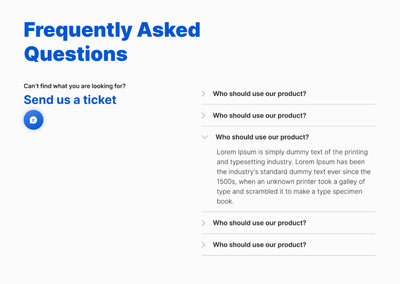
To address this, I recommend using MooseDesk, an app for creating unique FAQ pages for your customers. Besides helping you creating your FAQ and Contact us page, we also provide a helpdesk/ticketing system for your customer support.
Here are some of our templates:
FAQ page:
Contact us page:
The best part is that we offer various customization choices so you can customize and match with your store’s aesthetics.
Since our app is now available for free, all current users will be considered as early-bird users and get to enjoy all our current features for free forever!
As an expert/enthusiast in UX, I recommend implementing these changes to improve customer experience when scrolling through your store.
If this is helpful for you, please let me know by giving me a ‘LIKE’. If your question is answered, please mark this as 'SOLUTION’.
Thank you,
MooseDesk - Customer Support Helpdesk/FAQ app