Hello,
ive recently been getting loads of traffic from meta ads, but have a high bounce rate and low conversions. My website is www.hedgerowapparel.com
i typically send people directly to my best seller page
Hello,
ive recently been getting loads of traffic from meta ads, but have a high bounce rate and low conversions. My website is www.hedgerowapparel.com
i typically send people directly to my best seller page
To effectively advise on the possible cause for this we’d ideally need to analyse the data, but I can still offer a few pointers that may help.
Testing
Run tests with different wording and/or images on the ads to see what converts best. Don’t continue to throw budget at an ad that isn’t performing. Additionally consider the ad targeting in this too, location, demographic etc.
Landing page relevance
Try directing to a specific product instead of your best sellers page, aligning the ad image and copy to be more targeted towards that specific product.
Size Guide
I couldn’t find a size guide on the site which are especially helpful for gift buyers. This could be a separate page which is linked on each product page if most of the shirts share similar dimensions.
Product Images
Likely not directly linked to poor ad performance, but I’d like to see more close up images of the prints to showcase their quality in the product images. Static shots/mock ups are good, but seeing the physical product can really enhance performance.
Best of luck!
Simon
Hi @Hedgerow100 ,
Thanks for reaching out to the community. We are MooseDesk, a comprehensive Live Chat, FAQ & Helpdesk App designed to elevate your customer support experience.
Congrats on your new store! Your store looks stunning. I can tell you have put a lot of effort into building this. However, I have some comments to make the good get even better. Here are some of my recommendations for better customer experience, please kindly check.
1. Add a Favicon:
Including a favicon will make your store more recognizable when customers have multiple tabs open, helping reinforce your brand identity and increase visibility.
2. Revise the Homepage:
Consider removing the “All Shirts” section from the homepage. The homepage should provide general information about your store, not showcase products directly. Directing visitors to specific pages for products can increase their time spent on your website and lead to higher engagement.
3. Include a Size Guide:
Adding a size guide to your product pages is essential. Without it, customers might struggle to make quick decisions, leading to frustration and a higher bounce rate. Providing this information upfront helps streamline the buying process.
4. Enhance Product Descriptions:
Ensure you include more detailed product specifications. This allows customers to make informed decisions and better understand the value and features of the items they’re interested in.
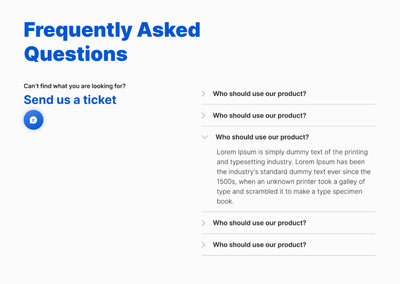
5. Add a FAQ, Contact Us Page, and Communication Widget:
Including these elements will boost customer confidence and make it easier for them to reach out with questions. A communication widget allows for real-time support, improving overall user experience.
I suggest exploring MooseDesk, a FREE LiveChat, FAQ & Helpdesk App that can help your support experience easier, better, faster!
With MooseDesk’s Omnichannel Support, you can engage with customers through live chat, manage inquiries with a robust ticket system, and provide quick responses via a WhatsApp button.
Or you can let customers resolve questions faster with in-built FAQ, Order tracking module, and more.
With FAQ builder, here are some of our templates:
FAQ page:
Contact us page:
As an expert/enthusiast in UX, I recommend implementing these changes to improve customer experience when scrolling through your store.
If this is helpful for you, please let me know by giving me a ‘LIKE’. If your question is answered please mark this as 'SOLUTION’.
Thank you for reading. Wish you nice day ahead
MooseDesk - All-in-one Shopify FAQ & Helpdesk App
Hi @Hedgerow100 ,
I’m from Mageplaza, a Shopify solution expert.
I would be glad to review your website and provide feedback on improving its performance. Below are some suggestions to improve your conversion rate:
1. Enhancing the Landing Page
Your website isn’t turning visitors into customers as effectively as it should, despite your advertising efforts. Without reviewing your ads, I can’t give specific feedback on your landing page, but here are a few tips inspired by Databox. You can find more details in their article.
A high click-through rate (CTR) but a low conversion rate often signals an issue with the landing page, frequently due to weak or unclear calls-to-action (CTAs). Consider adding a more direct CTA like “Buy Now” or “Learn More,” which could be a clickable image or a simple button with a brief text description.
2. Manage Cart Abandonment Rate
A high cart abandonment rate indicates many potential customers are not completing their purchases, contributing to low conversion rates. To address this, consider:
You can find more detailed guidance in Shopify’s Help Center.
3. Improve search bar
Enhancing the search bar’s functionality with larger images and showing pricing and discounts, adding collection search, category search can help users quickly find the products they are looking for, improving the overall shopping experience. Here is a reference:
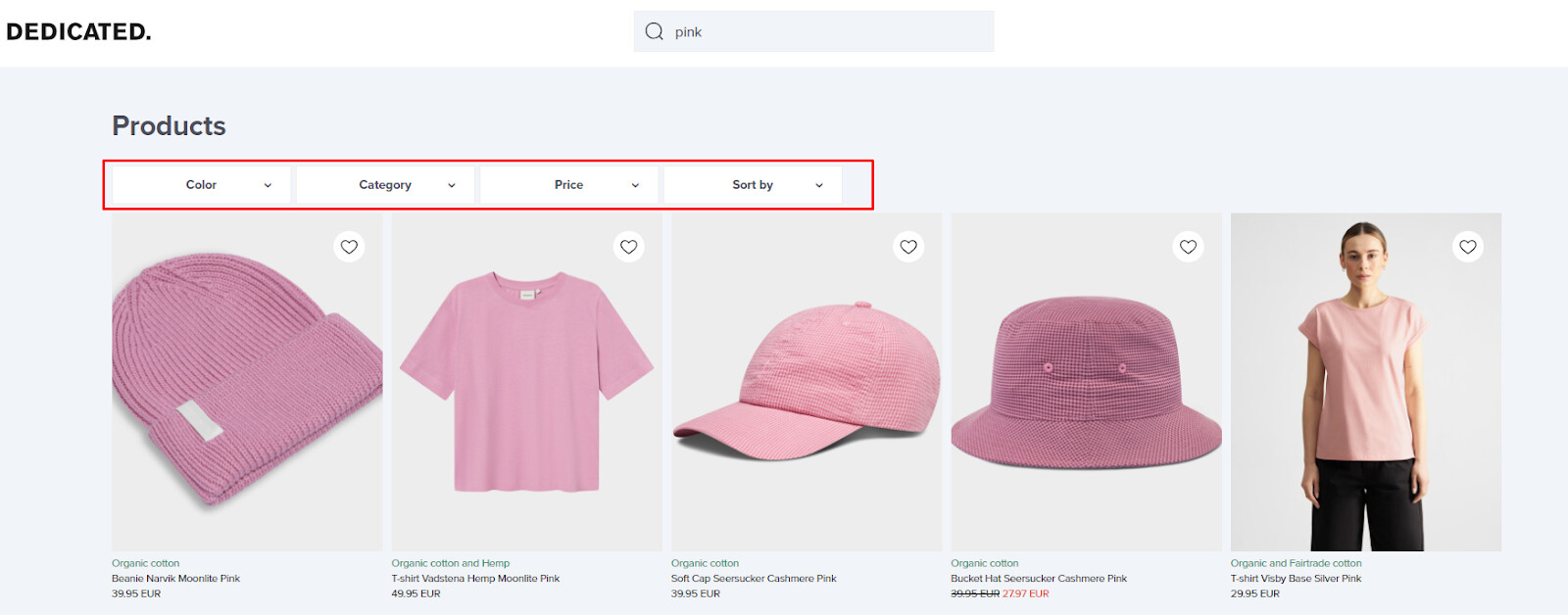
4. Improve category page
You should add more filter options like color, material, on sale, new arrivals, etc., to enhance customer experience, save time customer searching for products and therefore improve conversion rates. Here is a reference:
5. Provide more product details
Including product details such as size charts, material composition, and care instructions can give customers more confidence in their purchases, reducing potential returns or dissatisfaction. Here is a reference:
6. Recommended for you
You can add ATC, wish list or quick view buttons to encourage customers buying your products directly on this sections. Below is a reference:
I hope my suggestions are helpful, feel free to give me any feedback. Good luck!