How can I create a quantity-based variant option for multiple flavors?

Topic summary

Goal: enable quantity-based flavor selection for a fixed-size box (e.g., 9 chocolates from 30 flavors), with per-flavor +/- controls so customers can choose combinations like 6 of one flavor and 3 of another.

Proposed approaches:

  • Shopify line item properties: After selecting the base variant (e.g., “A Box of 9 chocolates”), collect flavor quantities via custom inputs and save them in cart line item properties (custom fields attached to a cart item). Screenshots illustrate the flow.
  • MultiVariants – Bulk order app: Adds a quantity selector per variant with “+” controls, supports min/max rules, predefined bundles, interval quantities, and limits at variant/order level. Sample product/store links provided; offers a trial.
  • Easify Product Options app: Uses image swatches with per-flavor quantity selectors (+/-), multi-select, and the ability to enforce an exact total (e.g., exactly 6) with a live counter, without creating many Shopify variants. Screenshots show settings and result.

Outcome: The MultiVariants app was confirmed by the requester to exactly meet the need. The thread is effectively resolved, with Easify noted as an alternative. Images/screenshots are central to understanding the UI behavior.

Summarized with AI on December 12. AI used: gpt-5.

Hello,
I’m looking for a solution to have a quantity based variant option.

For example:

A Box of 9 chocolates, there are 30 flavors for the client to pick from, however if the client wants to pick 3 flavours 3 units of each or a variation of 2 flavours , 6 milk chocolates and 4 pistachios , that’s where it gets tricky.

I tried some apps that allowed to have swatches with the flavors images to be picked, however it can only pick the flavor one time. If the client wants 6 units of a flavour and another 3 units of another flavour it doesn’t work.

Does anyone knows an app that can have some sort of “add” or “+” for individual variant option?
something like this example:

Thank you

Hi @Igorramade

You can try it on this way. Add those ‘variants’ to cart line item properties.

When customer select variant ‘A Box of 9 chocolates’, next step ask them to add flavours.

Then add information to properties

A Box of 9 chocolates

flavours 1: 6

flavours 2: 3

Hello @Igorramade ,Have you got the solution? As you want your customer to select the quantity from all variants of a product, “add” or “+” for individual variant options then you can try the MultiVariants - Bulk order app.

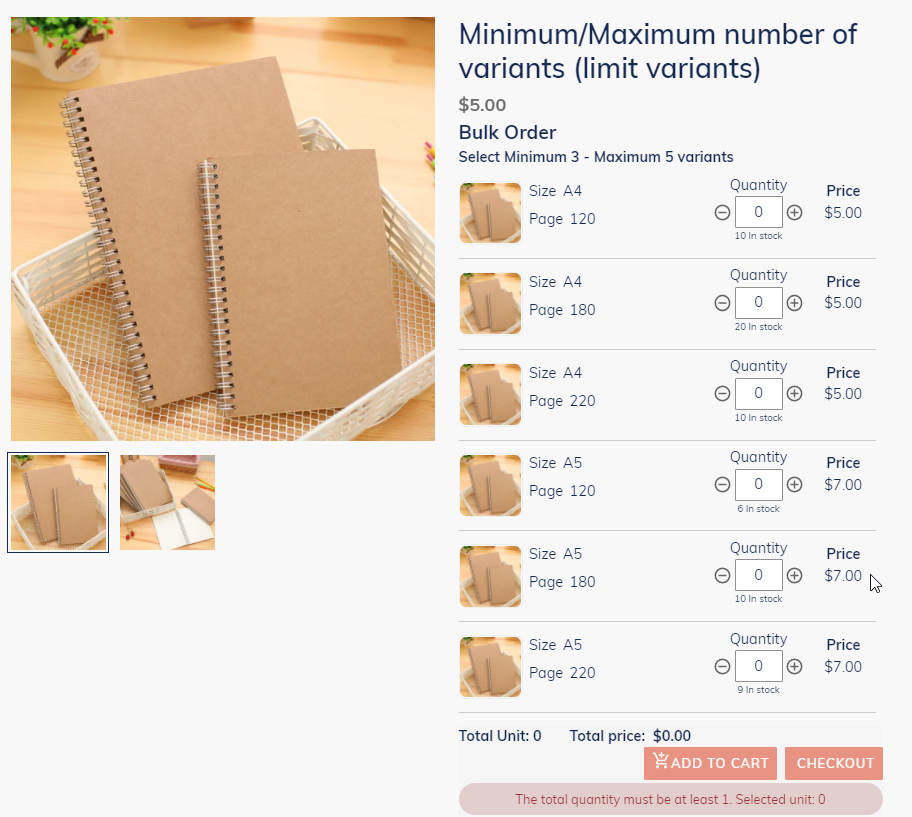
You need to create a product in Shopify and create variants that will be visible on the product page under the main product. By using this app, there will be a quantity selector for each variant. Your customer can choose their own combination of all variants. Your customers can add quantities by clicking on the “+” (plus) icon from the quantity field.

With this app, you can set the minimum-maximum restrictions for variants, so your customer must choose a quantity from all the available variants before going to the cart page. Additionally, through this app, restrictions for minimum-maximum quantities, predefined bundles, interval quantities, limits on variants and orders can be achieved. These restrictions are also applicable on the cart page.

If you’ve different criteria for different products in your store, then you can set rules according to that also. You’ll get 3 days of trial along with great customer support for exploring all other features.

Here is the Sample product where the customer can choose quantities from a minimum of 3 and a maximum of 5 variants before going to the cart page and here is the Sample store with more available features.

2 Likes

Wow!!
Hi Emilia, just checked the chocolate box sample..this is exactly what I was looking for!!
Thank you so much.. :clap: :clap: :clap: :clap: :folded_hands: :folded_hands: :folded_hands: :folded_hands:

1 Like

Hello @Igorramade ,

It’s great to know that you’ve got your solution. All the best!

1 Like

Hi @Igorramade :raising_hands:

If you need to allow customers to select multiple units of different flavors within a box (e.g., 6 pieces of flavor A, 3 pieces of flavor B…), you can easily do this with Easify Product Options, without creating dozens of complex variants in Shopify.

Here’s an example I’ve created so you can see how it works:

  • This is the result:

  • This is the app setting:

First, simply create a new Option Set in Easify and add the “Select 6 Cupcakes” option. Choose the Image Swatch display style, and upload images of each flavor so customers can choose visually.

Next, enable the Allow Quantity Selector for option value so that each flavor has an increase/decrease button (+/-) for the quantity, as shown in the demo. Buyers can choose 6 cupcakes of the same flavor or mix and match flavors as they like - and the total quantity selected will be counted in real time under the “You’ve chosen” section.

Next, enable the “Select Multiple” option, and to require customers to select exactly 6 cupcakes from the box, simply enable the “Set exact total quantity for all selected items” setting. The system will then display a total counter and prevent customers from selecting more or less than the specified quantity.

Easify also supports displaying all flavors simultaneously with clear images, labels, and selectors, enhancing the shopping experience and reducing confusion when selecting multiple options.

Whether you’re new or experienced, this app makes product customization a breeze. Easify’s team is always there to guide you and make sure things work perfectly.:blush: