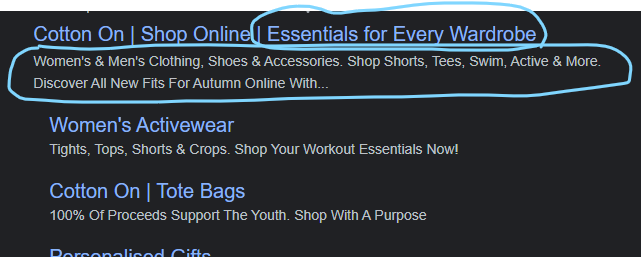
How can I edit my website bio in Shopify for search results?

Topic summary

Editing the “website bio” for search results refers to changing the homepage meta title and meta description. These are the snippets Google shows on the results page.

How to edit in Shopify:

  • Online Store > Preferences > Title and meta description (within Sales Channels > Online Store > Preferences).
  • Keep both fields within recommended character limits.

Current status: The changes were made but aren’t appearing in search yet. This is likely due to indexing delays—Google may take time to crawl and update snippets.

Next steps and recommendations:

  • Use Google Search Console to request reindexing of the homepage after changes (URL Inspection > Request Indexing).
  • Ensure meta title/description are concise and relevant to improve click-through rate (CTR).
  • Optional: use an SEO tool/app to help craft high-CTR tags.

Notes:

  • No conflicting opinions; guidance is consistent across replies.
  • Outcome remains open pending Google’s reindexing and update of the search snippet.
  • Screenshots illustrate the Shopify navigation path but aren’t essential to follow the steps.
Summarized with AI on December 28. AI used: gpt-5.

Hi where in Shopify can i edit my website bio - for search page results

thanks

Hi @WINNIER

You can edit the meta title and description for your homepage in Online store > Preferences > Title and meta description.

Hope this helps!

Thank you; i have this completed but still not showing

example

Website bio is named as meta title and description. Which can be changed from your store dashboard. Follow the below steps:

  • Find out the “Sales Channels” interface at left sidebar
  • Click on the “Online Store” option
  • Here you will see “Preferences” section
  • Once clicked on this option it will lead to the meta tags editing interface

Keep both the meta title and description under the maximum character limits. Once the updates are completed resubmit the page for indexing using Google Search console.

If you facing any trouble choosing the meta tags, get help from the ConvertMate SEO app that can generate tags with high CTR.