How do I create an automated email that is sent when a customer orders a specific product

Topic summary

Automate a safety email specifically for knife purchases by creating a post‑purchase workflow that filters orders for those products.

  • Shopify Flow or Klaviyo: Create the safety email, then build a conditional flow that triggers after purchase and filters by product tags or SKUs tied to knives. This ensures only relevant buyers receive the message.

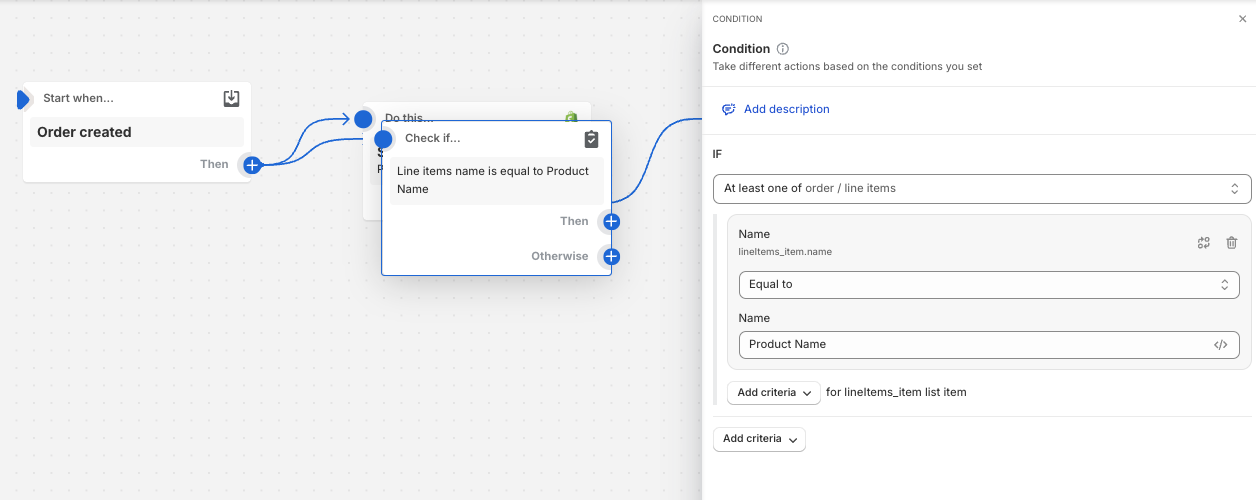
  • Shopify Email: Set up an automation with trigger “Order created,” then add a condition to check if the order contains the knife products. A shared screenshot illustrates the condition logic for product-based filtering.

  • Third‑party option: AiTrillion can segment customers and send messages across Email/SMS/WhatsApp/Web Push within one app, supporting product-specific targeting.

  • Key terms: SKU (stock keeping unit) identifies products; Shopify Flow is Shopify’s native automation tool; Klaviyo is an email marketing automation platform.

  • Status: No final setup confirmed. The path forward is to choose a tool (Shopify Email/Flow, Klaviyo, or AiTrillion) and configure product-based conditions to send the safety email only for knife orders.

Summarized with AI on December 11. AI used: gpt-5.

Basically, I need to send an additional safety email to a customer when they buy knives off my site, however I firstly don’t know how to create a new email to be able to send. I also don’t know how to have it so it sends only if the customer orders specific products (the knives).

Please may someone guide me through this process?

1 Like

Hey Lukafernada,

Heddy from Gameball: Loyalty Program & VIP here!

To send a safety email when customers buy knives, you’ll need to set up conditional email automation. You can use Shopify Flow (if available on your plan) or an email platform like Klaviyo. First, create the email with safety instructions in Klaviyo or your email tool. Then, set up a flow that triggers only when a customer buys a specific product by using product tags or SKU filters for knives. This way, the email is automatically sent after the purchase.

Let me know if you need further details on setting this up!

In Shopify Email, you can create an automation and for the trigger use order created and then you’ll want a condition like this:

1 Like
Hello @lukafernada ,

I hope you are well!
The emails to the customers with a specific products can be done with the help of AiTrillion.

With AiTrillion, you will get various feature to segment the customers and you can use Email/SMS/Whatsapp/Web push/Flows, Reviews, Membership and various tools with single app and single tool.