I want to put coming soon instead of sold out on the link attached

Topic summary

A user wants to change the “Sold Out” label to “Coming Soon” on their Shopify product pages.

Two solutions provided:

  1. Code editing approach: Navigate to Online Store → Themes → Edit Code, locate the en.default.json file, and replace “Sold out” text with “Coming Soon.”

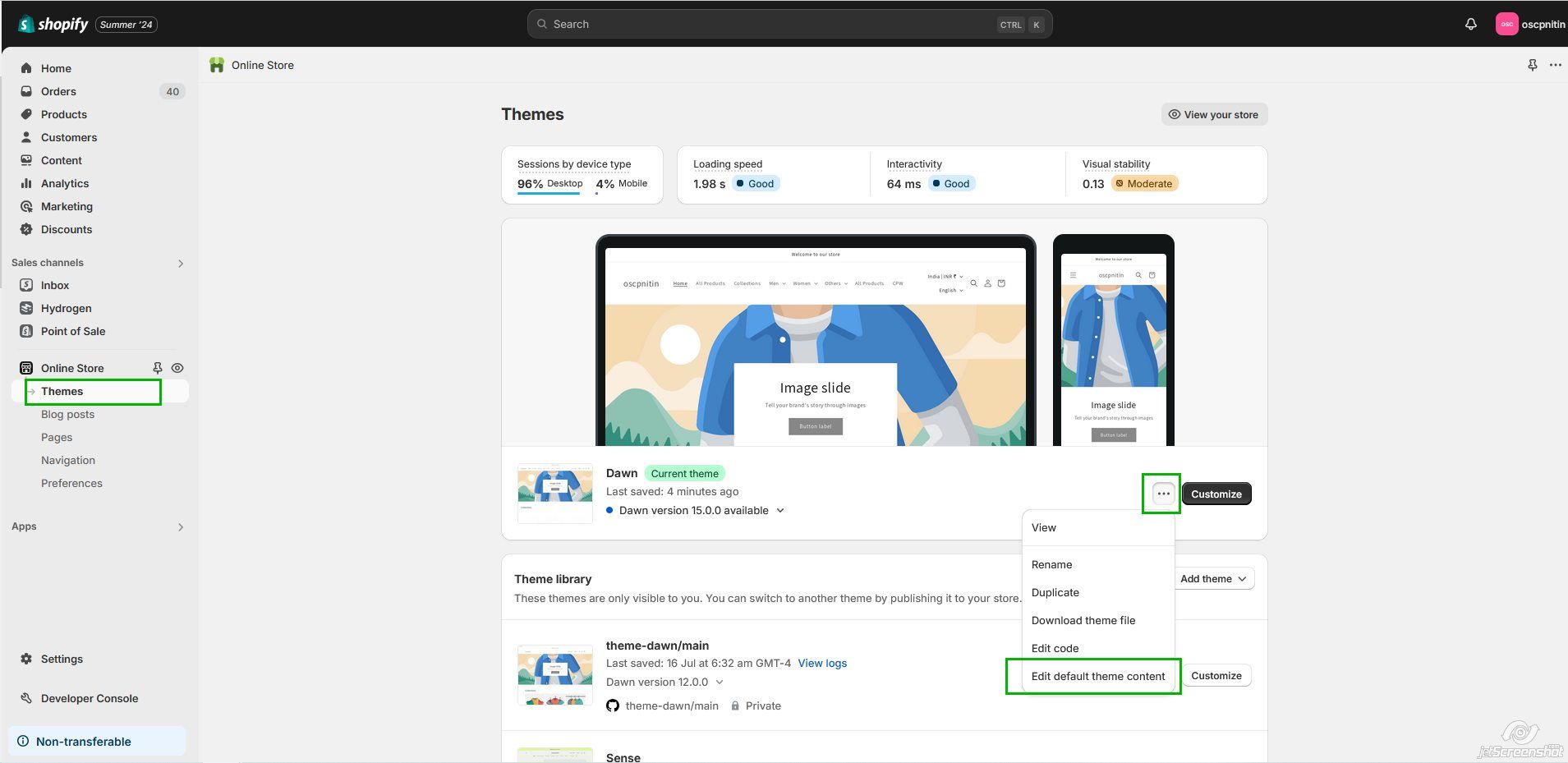
  2. Admin interface method: Access theme settings via three dots menu → “Edit default theme content” → Products tab, then modify the “Sold out” text field to “Coming Soon” and save.

Both methods include visual screenshots demonstrating the steps.

Follow-up question: A participant asks whether it’s possible to display “Sold Out” for some products while showing “Coming Soon” for others simultaneously. This question remains unanswered, suggesting the discussion is ongoing regarding conditional labeling based on individual product status.

Summarized with AI on October 30. AI used: claude-sonnet-4-5-20250929.

I want to put coming soon instead of sold out on this page and other products link https://swawe.store/products/embroidery-great-wave-streetwear

Hi @attackon

Welcome to Shopify Community.

If you want to replace the text, please go to Online Store → Themes → Edit Code

Search for the file en.default.json

Search for Sold out and replace it with Coming Soon.

This should do the trick.

Thank you,

Sajat


If this is helpful, please Like and Accept the solution.
Want to modify or custom changes on store? Let me help.

Hello @attackon ,
By follow this steps you can achieve this:

  1. Login to your shopify admin.

  2. Select your theme and Click on three dots(…).

  3. click “Edit default theme content” option and click on products tab.

  4. Find Sold out and change text of input box from Sold out to coming soon and save.
1 Like

Thank you, I appreciate the guidance.

Is there a way to put some products on “Sold out” and others on “coming soon” ?

1 Like