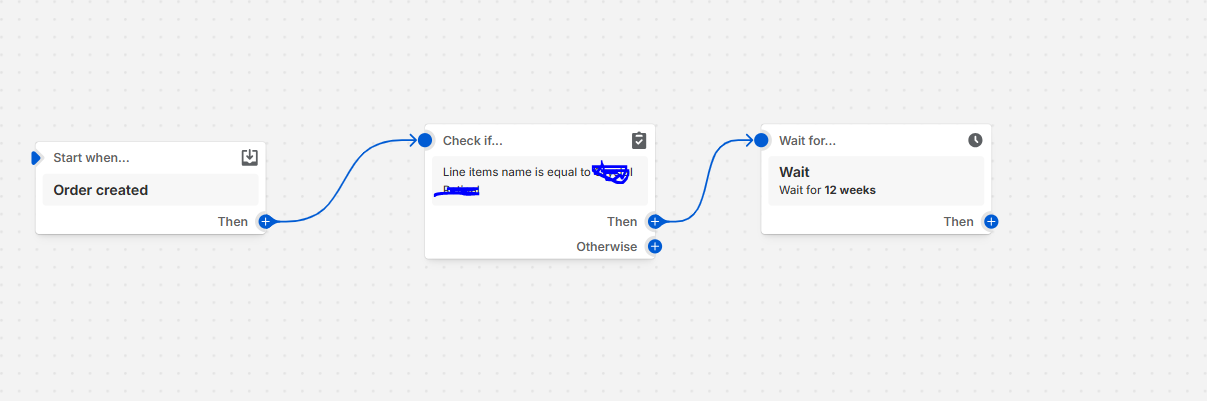
Hi there! I’m working on setting up a product refill flow.
I wanted to check in and ask if the flow I’ve outlined below looks good to you or if there’s anything you’d recommend adjusting. Thanks!
Hi, @fert1001
So overall, your flow structure is solid — just a few tweaks to make it even better:
Consider checking by SKU or product ID Right now, you’re using the product name to check the line item. That works, but it’s a bit fragile — if the name changes even slightly (like an added emoji or typo fix), the condition might fail. It’s more reliable to check by SKU or product ID, which don’t change.
Add a step after the wait After the “Wait 12 weeks” step, you’ll want to actually do something — like send an email reminder. Otherwise, the customer just waits and… nothing happens  You could send a message like: “Hey! It’s been 12 weeks — ready to restock your [product name]?” If you’re using Shopify Email or Klaviyo, this is a great place to plug that in.
Hope this works smoothly for your refill strategy!
Best,
Owen.
@fert1001 what are you trying to achieve with the flow? It seems flow is incomplete as there is nothing after “Wait for”.