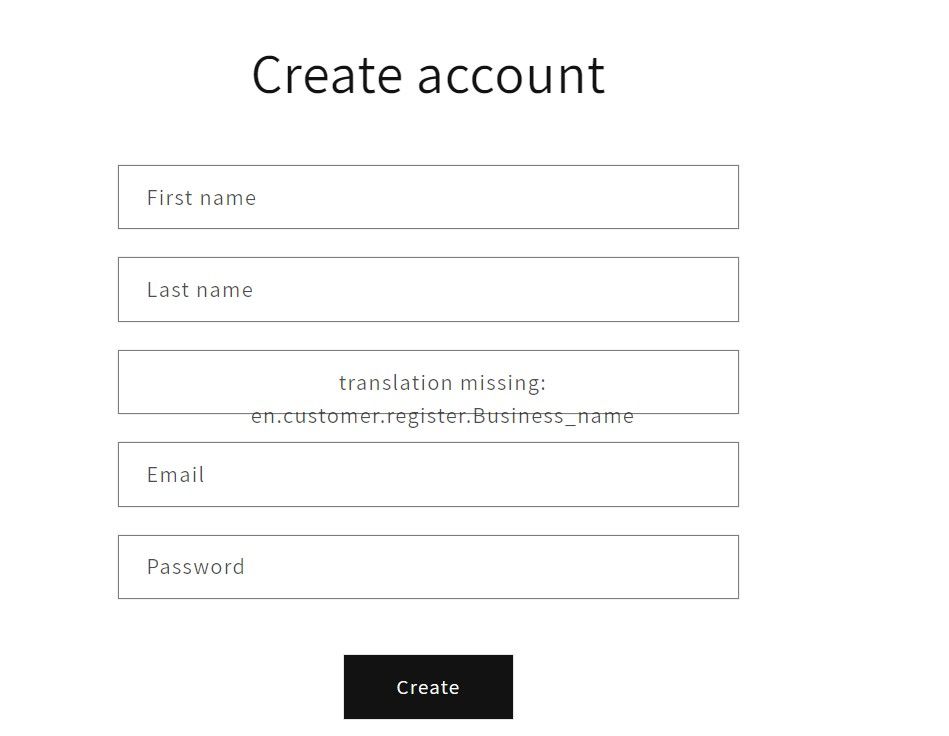
Trying to add addition form fields to my registration form

Topic summary

A user is attempting to add custom fields (like “Business Name”) to a Shopify customer registration form but encounters display issues.

Initial Problem:

  • Custom field code added to the registration form template shows placeholder text instead of the actual label
  • The field appears on the frontend but doesn’t function correctly

Solution Provided:

  • Must add corresponding entries to the locale file (en.default.json under Theme > Locales)
  • Search for “register” section and add new field entries (e.g., "Business_name": "Business Name")
  • Same process applies for other field types like checkboxes

Critical Limitation Identified:

  • Custom fields added this way only appear on the frontend registration form
  • Data does NOT sync to Shopify Admin > Customers page automatically
  • To store and display data in admin, requires either:
    • Using Shopify Admin API (requires custom or third-party app)
    • Saving to customer notes/metafields following Shopify’s tutorial
    • Installing apps like “Customer Fields” to bridge this gap

Ongoing Questions:

  • Users seeking clarification on which specific files to edit (register.liquid vs. en.default.json)
  • Confusion about backend data processing remains unresolved
Summarized with AI on November 10. AI used: claude-sonnet-4-5-20250929.

in the form field I believe I have located a complete entry to add field.

Original copy: from Dawn template:

{{ 'customer.register.last_name' | t }}

My Changes to this:

{{ 'customer.register.Business_name' | t }} </div

I am include the return snippet so you can see how it came out.

Please show me what I am doing incorrect so I can add this and I want to add a subscribe and unsubscribe check box so they have to choose one or the other for emails or sms.

Thank you

Ron

Hi Psco,

You need to add an entry for Business_name in your default locale file .

File can found under Theme > Locales > en.default.json .

In this file try searching for “register” , it might look like this:

“register”: {
“title”: “Create account”,
“first_name”: “First name”,
“last_name”: “Last name”,
“email”: “Email”,
“password”: “Password”,
“submit”: “Create”
}

Here we’ll need to add an entry for “Business_name” and it’s text string.

Same for all other new fields like checkboxes etc.

1 Like

Hi,

I have followed the steps here and successfully added additional fields to the customer registration form. However, when a customer registers, the additional information does not show on their customer account. Where can I see the additional fields they filled out on their account?

Hi,

I would think that is because you just added the field in the frontend and don’t do anything with it in the backend, where the data is processed and stored. Have you figured out a simple way to do that?

@OliviaAnn1 - The only way to add new fields to the customer registration form that sync to the Shopify Admin > Customers page is via the Shopify Admin API. Said another way, an app is required. Either a custom app or a ready-made third-party app.

We built the Customer Fields app to help bridge this gap.

Otherwise, you’ll need to follow Shopify’s tutorial on saving custom fields to the customer note section.

If I want to add new field ,can you tell me which page I need to edit . en.default.json file ? but chatgpt said add new field to the customers/register.liquid page , but I couldn’t find that page. Help me