Hi there,
I am busy in the pre-launch phase of my store and I am wanting to collect as many email subscribers as possible. Currently I have a home page that is the ‘coming soon’ page with the option to subscribe.
Before I launch this page I want to be able to set up an AUTOMATED welcome email to everyone who subscribes. I have loaded the shopify email app but I don’t see the option to do this type of email?
Can anyone help with advice or if I need to integrate a different app that allows for this automation? low to no cost please.
Thank you,
Giulia
Hi, Its’s very simple you should follow these steps which is given below.
- On your account dashboard, click the Automations icon.
- Click Classic Automations.
- Click Welcome new subscribers.
- On the Single email tab, enter a campaign name and click the drop-down menu to choose an audience.
- Click Begin.
2 Likes
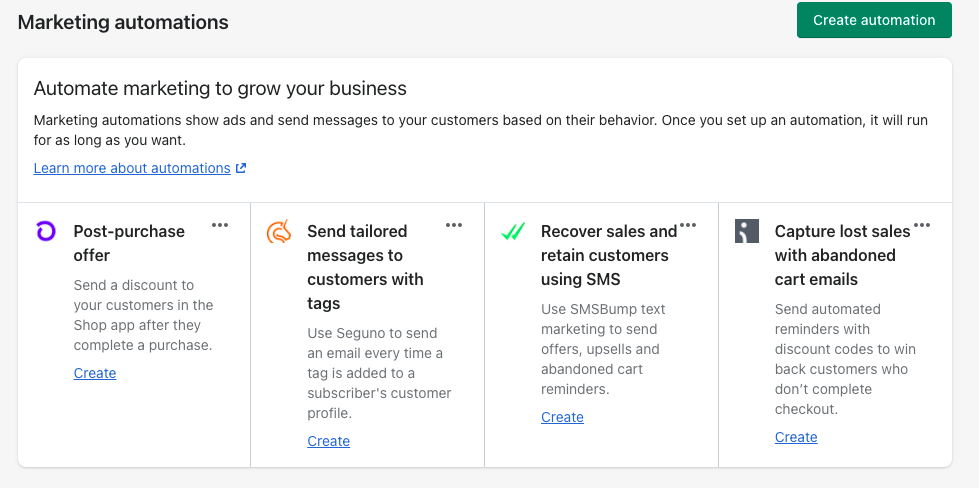
Thanks so much, is this using the shopify email app? I don’t have the option of ‘classic automation’ only the follwing:
1 Like
Create an automated Welcome Email that sends to new contacts when they join … List Options, Header and Footer Content, and Activate Button.
My AARP Medicare
Hi @Giulia3
Marketing automation is becoming an increasingly important part of digital strategies.
The power of marketing automation is also possible in the format of Web Push Notifications!
Here are six web push notification campaign templates to automate and maximize your conversions  https://adrenalead.com/en/marketing-automation-6-campagnes-web-push-notification-a-automatiser-maximiser-conversions/
About your request,
You can start sending more personal, better targeted communications in a matter of seconds. Klaviyo will seamlessly collect and store all relevant data about your customers so you can use it to deliver memorable experiences, drive more sales, and create stronger relationships with Klaviyo and Shopify.
With Klaviyo, you can get email marketing, SMS text marketing, phone push notifications, and social media functionality. If you want more marketing channels and powerful automation features for less money (if you have more than 250 contacts), Mailchimp may be the way to go.
Hi @Giulia3
You can set up welcome automation in AVADA Email Marketing app which supports you to send up to 15000 emails per month for free. In the welcome automation, you can set the wait time or send your customers with a coupon code ( you can use static coupon or dynamic coupon). Easy to use Drag and Drop to edit the template
Also, you can use other functions like popup form to collect more leads and another automations as abandonded cart, ask for review…
I hope this answer helps
Creating a welcome automation email in Shopify is a great way to engage new customers and introduce them to your brand. Here are the steps to create a welcome email automation in Shopify:
- Go to the Shopify admin panel and click on “Settings.”
- Click on “Notifications.”
- Scroll down to the “Customer notifications” section and click on “Welcome email.”
- Click on “Edit email” to customize the email.
- Add your brand logo, images, and a personalized message to welcome your customers.
- Include a call to action, such as a discount code or a link to your website.
- Preview and test the email to ensure it looks and works as intended.
- Save the changes and turn on the automation by toggling the “Enabled” button.
It’s important to note that Shopify offers various customization options for welcome emails, including the ability to add dynamic content like the customer’s first name or recently viewed products. You can also use email marketing apps in the Shopify App Store to create more complex email automations. MyAARPMedicare
Overall, creating a welcome automation email in Shopify is a straightforward process that can have a significant impact on customer engagement and retention. By following these steps and customizing your email with compelling content and calls to action, you can welcome new customers and start building a strong relationship with them.
1 Like
Creating a welcome automation email in Shopify is a great way to engage new customers and introduce them to your brand. Here are the steps to create a welcome email automation in Shopify:
- Go to the Shopify admin panel and click on “Settings.”
- Click on “Notifications.”
- Scroll down to the “Customer notifications” section and click on “Welcome email.”
- Click on “Edit email” to customize the email.
- Add your brand logo, images, and a personalized message to welcome your customers.
- Include a call to action, such as a discount code or a link to your website.
- Preview and test the email to ensure it looks and works as intended.
- Save the changes and turn on the automation by toggling the “Enabled” button.
It’s important to note that Shopify offers various customization options for welcome emails, including the ability to add dynamic content like the customer’s first name or recently viewed products. You can also use email marketing apps in the Shopify App Store to create more complex email automations. MyAARPMedicare
Overall, creating a welcome automation email in Shopify is a straightforward process that can have a significant impact on customer engagement and retention. By following these steps and customizing your email with compelling content and calls to action, you can welcome new customers and start building a strong relationship with them.