Store Feedback - Struggling with making sales

Hey everyone. I recently opened the store https://shop-essentials.net I’ve advertised on Facebook, Messenger, Instagram, YouTube, and TikTok. The store has been open for 2 weeks and I’ve had 800 visitors, but no sales. I haven’t even had anyone add anything to their carts. Just looking for feedback as to what I should do/change.

Thanks everyone,

~ Shop Essentials

Over the years, due to our experience in creating numerous e-commerce sites, we’ve noticed some mistakes that new users tend to make. Simply opening a site on Shopify won’t lead to sales; it depends on your proper planning and effort.

  1. No one typically places products like this on the homepage. Create a catalog here, and when a person clicks, they should go to the product.
  2. There are some issues with color harmony.
  3. Homepage resembles a blog site rather than an e-commerce site. Consider getting design training or looking at your competitors for inspiration.
  4. Work needs to be done on the slider and slider image section.
  5. The footer seems incomplete and looks half-done.
  6. On the product page, separate the descriptions and other features like ‘Benefits’ into different tab sections.
  7. The comment section on the product page is nice but needs a bit more work in terms of design.

If you address these issues initially, you’ll at least make a good start, I believe. However, the backend of e-commerce sites is as crucial as the frontend.

In fact, if there are 100 factors determining success, the ones listed above may seem small individually but are impactful together. Remember, the product you’re selling is likely sold by thousands of others, so you always need to stay ahead of your competitors.

Terence Keane

Best Regards,

After a quick view of your shop, I have a few suggestions:
-Consider focusing your advertising efforts on one or two platforms (I would recommend FB & Tiktok) you may get better results at least while you’re just getting started

-The “cookies” bar covers the navigation menu of your website, this is bad from a users perspective and will have a negative effect on conversion rate

![biznazz101_0-1707420210752.png|2701x1517](upload://caFMLNev2Cf5JLt8INhtqqPA4T0.jpeg)

-Like another user mentioned, the product layout on the homepage could be improved/condensed. You could also add some additional info about your brand once that has been done

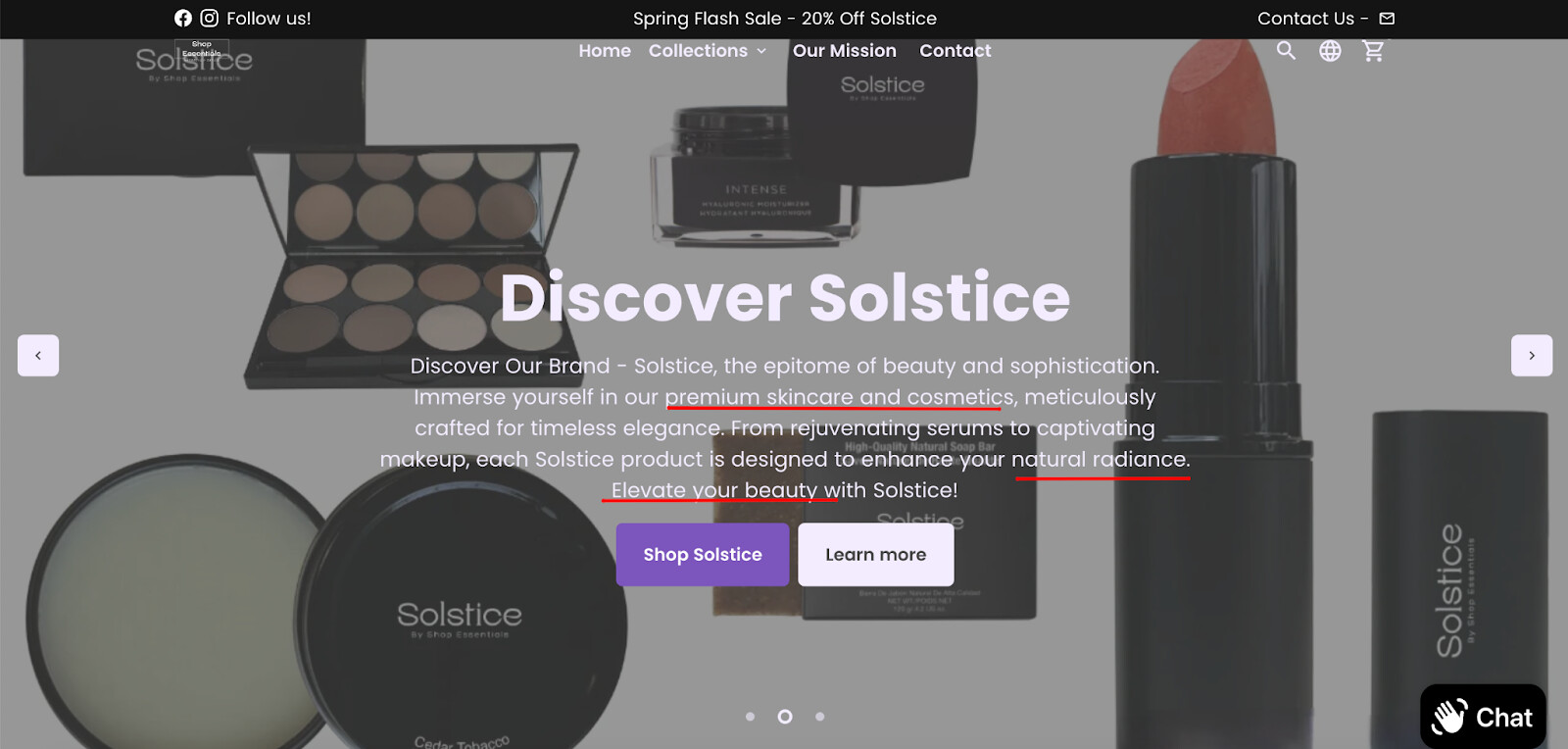
-I would make the “Shop Essentials” the first slide on the homepage

![biznazz101_1-1707420339753.png|2703x1517](upload://32K1uvk124Crc24GUvqEFDY2fFT.jpeg)

-I would consider making the product descriptions appear to the right of the product to save space, as well as putting everything below the description into collapsible tabs. For example:

![biznazz101_3-1707420519204.png|2698x1518](upload://x3QqZ6dRjpTXh9dquocVSqWmDtT.png) ![biznazz101_2-1707420488161.png|2702x1652](upload://pdMKlOFd2ygZLXcqyTDCye9twJ0.jpeg)

-I would recommend adding at least one image to the “Our Mission” page and maybe a FAQ section below the existing text.

-Your logo is far too small making it unnoticeable and not very distinctive, I would make it larger, and consider a redesign.

Hope that helps!
@biznazz101

Hi @ShopEssentials ,

This is Kate from PageFly - Shopify Landing Page Builder app.

Based on my experience, your store looks fantastic with its stunning images, easy navigation, and clear text. Drawing from my extensive knowledge in CRO (Conversion Rate Optimization), I would like to recommend a few suggestions to enhance your conversion rates:

1. Strengthen the Story of Your Brand

A compelling story places your visitors at the heart of your message, helping them understand that we are collaborating towards a shared objective. Brand narratives not only build credibility but also foster trust, leading to increased conversions.

To provide more clarity, it’s beneficial to demonstrate to your visitors where they can find these resonating messages within your store and products.

Enhancing the mission section with visual aids, such as images or videos, can significantly improve engagement and comprehension.

For example:

Additionally, there are opportunities to refine other branding elements, including your logo and brand colors. Incorporating consistent and strategic branding elements will strengthen your brand’s identity and appeal to your target audience.

2. Engage Customers with Promotions

Attracting customers, especially when you are just starting, can be effectively done through promotions. You did very well on the announcement bar.

To make it even better, you can consider a countdown clock section for time-sensitive offers

3. Add a testimonial section to increase trust

You should consider showing real experiences and feedback from your customers. As a result, you will not only foster a sense of community but also build a strong foundation of trust and credibility. For example:

4. Organize your homepage for conversion-optimized

It’s about creating touch points for visitors when they visit your store. The right emotion may turn them into customers. You can check this order, which is suggested by PageFly’s CRO expert:

Continue your excellent work and remain patient. Hope my opinions can help you in your journey.

Best regards,

Kate | PageFly

Hi @ShopEssentials ,

Thanks for reaching out to the community. This is MooseDesk - All-in-one Shopify Ticketing System App.

Congrats on your new store! Your store looks stunning. I can tell you have put a lot of effort into building this. However, I have some comments to make the good get even better. Here are some of my recommendations for better customer experience, please kindly check.

1. Logo Resizing

Resize your logo for better visibility and to enhance brand identity. Ensure it is prominent but not overpowering, striking a balance in the overall header design.

2. Homepage

2.1. Hero Banner

Consider changing the hero banner picture to something more visually appealing, evoking amazement and attracting customers instantly.

For the upcoming spring sale, consider reconstructing the banner to highlight the sale and foster immediate customer engagement. Additionally, consider relocating it to a distinct section on the homepage, such as the Call-to-Action section. This placement aims to avoid distraction from the main hero banner and pique the interest of visitors, prompting them to delve deeper into the product pages of your website.

Here is an example on how to display your spring sale banner:

2.2. Product Introduction

Rather than listing products on the homepage, create a dedicated section to introduce and showcase the various product lines you offer. This will prevent the misconception that you only sell a limited selection.

You can follow this example:

2.2. Testimonials/Reviews

Include a testimonials/reviews section to build trust and credibility. Positive feedback from satisfied customers can significantly influence potential buyers.

Here is an example for you:

2.3. Product Benefits

Introduce a product benefits section to highlight your unique selling points. Clearly communicate what sets your store apart from others in your product market, helping customers make informed decisions.

2.4. About Us section

Consider moving the Our Mission page to the homepage, providing a brief overview of who you are and your brand identity. This will enhance customer understanding and trust without requiring navigation to other pages.

3. Footer

Reconstruct the footer for improved navigation. Include sections such as:

  • Shipping policy
  • Refund/return policy
  • Copyright notice to prevent any person from stealing the content on your website
  • Privacy policy link
  • Your logo
  • Contact information (email address, phone number, address) to enhance reliability. Also, consider shortening the footer description for a more concise presentation.
  • Social media icons.

Here is a reference for you:

4. Customer Support

I’ve noticed that your customer support currently includes live chat, a contact us form, and email options. However, relying on multiple channels may lead to missing customer requests.

To address this, I suggest exploring MooseDesk, a free support, help center, and ticketing system app. MooseDesk provides auto-reply features during non-business hours, a proactive help center, and a user-friendly widget layout, offering an effective solution to enhance customer support on your platform.

As an expert/enthusiast in UX, I recommend implementing these changes to improve customer experience when scrolling through your store.

If this is helpful for you, please let me know by giving me a ‘LIKE’. If your question is answered please mark this as 'SOLUTION’.

Thank you,

MooseDesk - All-in-one Shopify Ticketing System App